
Most "what's new" lists for a CAM release read like they were written for someone who has never stood at a lathe, a wall of bullet points that could describe any year's update if you swapped the version number. SOLIDWORKS CAM 2026 is a modest release on its own, two real wins for turning work. CAMWorks 2026 is not modest at all, because it adds a genuine Swiss machining environment that a shop running true Swiss-type turning centers has been waiting on. Here is what actually changed, what it is for, and the one tier detail that trips up buyers before they ever open the software.
What changed in SOLIDWORKS CAM 2026?
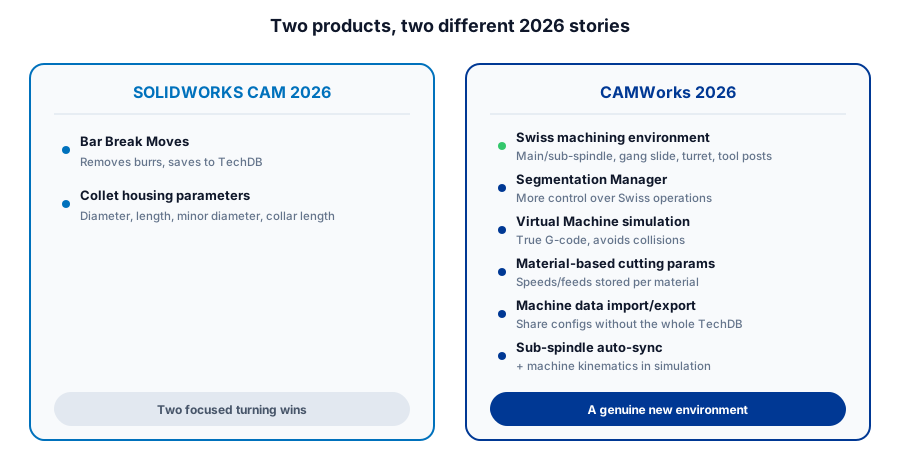
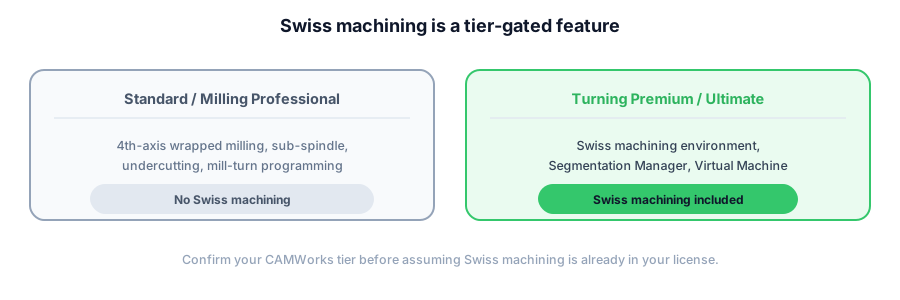
SOLIDWORKS CAM 2026 and HCL CAMWorks 2026 are related, but they are not the same release scope. SOLIDWORKS CAM 2026 adds bar break chamfers for turning and new collet housing parameters. CAMWorks 2026 adds a dedicated Swiss machining environment with Segmentation Manager and Virtual Machine true G-code simulation in Turning Premium and Ultimate, plus material-based cutting parameters, TechDB machine-data transfer, and synchronization improvements.
SOLIDWORKS CAM 2026: Bar break chamfers and better turning setup
The feature worth using immediately is bar break chamfers, sometimes described as bar break moves, which add a chamfer to turned stock to prevent burrs from damaging guide bushings. SOLIDWORKS documents support across Turn Rough, Turn Finish, applicable OD Groove Rough and Finish, and Face Rough and Finish toolpaths. The settings can be saved in the TechDB, so the next similar turned part can reuse the standard instead of a programmer rebuilding it by hand.
Alongside it, new collet housing parameters, collet housing diameter, length, minor diameter, and collar length, let you build a more accurate picture of your actual workholding into the setup instead of approximating it. It is a small addition, but a toolpath simulation that reflects your real collet is a toolpath simulation you can actually trust before the first part goes in the machine.
CAMWorks 2026's real headline: a genuine Swiss machining environment
If your shop does not run Swiss-type turning centers, this section is not for you, and that is fine, skip to the smaller wins below. If it does, CAMWorks 2026 adds a dedicated Swiss machining environment supporting the industry-standard configurations, main and sub-spindle, gang slide, turret, and end and back working tool posts, that make a Swiss machine genuinely different to program from a standard lathe. Swiss centers show up everywhere from plumbing components to aerospace and defense work, precisely because they hold and machine long, thin parts that would flex or chatter on conventional turning. CAMWorks has not had a purpose-built environment for that until this release.
Not sure whether the Swiss machining environment or the smaller CAM wins actually apply to your shop?
Get a QuoteSegmentation Manager and Virtual Machine simulation
The Swiss environment ships with two tools built to work together. The Segmentation Manager gives a programmer more control over how a Swiss operation is broken into segments across the machine's spindles and tool posts. CAMWorks has been candid that the exact mechanics depend on your specific Swiss setup rather than a one-size answer. Virtual Machine simulation is the more immediately useful half. It runs true G-code against a simulated version of your actual machine to prove out the program, eliminate dry runs, and catch collisions before they happen, extending the life of a machine that never has to absorb a crash to teach you it was going to happen. CAMWorks 2026 also adds a machine kinematics display during Toolpath Simulation, so the physical machine components show up alongside the cut, not just the part and the stock.
If a wrong sub-spindle synchronization or a mistimed tool post move has ever cost you a scrapped part or a bent tool on a Swiss job, this is the pair of features built to catch that before the spindle ever turns.
The smaller wins that add up
A handful of CAMWorks 2026 changes will not make a keynote but will save real minutes on the floor. Material-based cutting parameters let you store turn insert speeds and feeds by material rather than by tool alone, so switching from a mild steel job to a stainless one pulls the right numbers automatically. Machine data import and export between TechDBs means you can hand another seat your machine configuration without shipping your entire tool library and shop standards along with it. That is useful the moment a second programmer or a second shop needs the same machine profile but not your whole database. Sub-spindle auto-synchronization lets you associate a sub-spindle operation with another operation automatically instead of timing the handoff by hand. An expanded Sync Manager now shows views by turret or by spindle so you can actually see what you configured.
What about SWOOD?
You may see SWOOD mentioned alongside SOLIDWORKS CAM and CAMWorks in the 2026 CAM lineup, and it is worth naming just so you do not mistake it for something aimed at metal parts. SWOOD is a CAD/CAM add-in from EFICAD built specifically for woodworking, drilling, routing, nesting, and pocketing with wood-specific concerns like grain direction and edge banding. If you cut metal, there is nothing here for your shop, and that is the whole point of mentioning it.
What this means for your shop
If you do not run Swiss-type turning, the 2026 release is a quiet one for you. Adopt Bar Break Moves for deburring, use the new collet parameters to tighten up turning setups, and let the material-based cutting parameters carry across jobs once you have them dialed in. If you do run Swiss machines, the environment, Segmentation Manager, and Virtual Machine simulation are worth a serious look. Confirm your CAMWorks tier first, since the functionality lives specifically in Turning Premium and Ultimate and not below it. Either way, none of this replaces a programmer who knows the machine, it just gives that programmer fewer excuses to find out the hard way.
Sorting out SOLIDWORKS CAM or CAMWorks for 2026?
Morphos 3D sells and supports both, which means matching the 2026 features that change how you cut parts to the tier that actually has them. See CAMWorks vs SOLIDWORKS CAM: what a VAR recommends for the tier decision itself, the SOLIDWORKS CAM Standard vs Professional breakdown, our 5-axis vs 3+2 machining guide, and the TechDB walkthrough for how these wins carry across jobs. Support is there when you want a real answer about your own machines.
Sources and review scope
The feature list was reviewed on August 13, 2026 against the current vendor documentation. Product availability and licensing should still be confirmed for the exact account and tier.
- SOLIDWORKS 2026 Help: Bar Break Chamfers for Stock in Turn Toolpaths.
- SOLIDWORKS 2026 Help: Collet Housing Parameters.
- HCL CAMWorks 2026: official feature and tier overview.
Before a purchase or rollout, test the relevant feature on a real job with the representative-part validation method.