
Program the same bracket, the same pocket, or the same bolt circle for the hundredth time and you reach for the same tool, the same feed, and the same depth of cut from memory. That memory is exactly what the SOLIDWORKS CAM TechDB captures. Instead of carrying your shop's best practices in your head or in a binder of process sheets, you store them in software that applies them the next time a matching feature shows up. This breaks down what the Technology Database actually is, how rules-based and tolerance-based machining work, and how a CNC shop builds its own database so programming gets faster and more consistent every month.
What does the SOLIDWORKS CAM TechDB do?
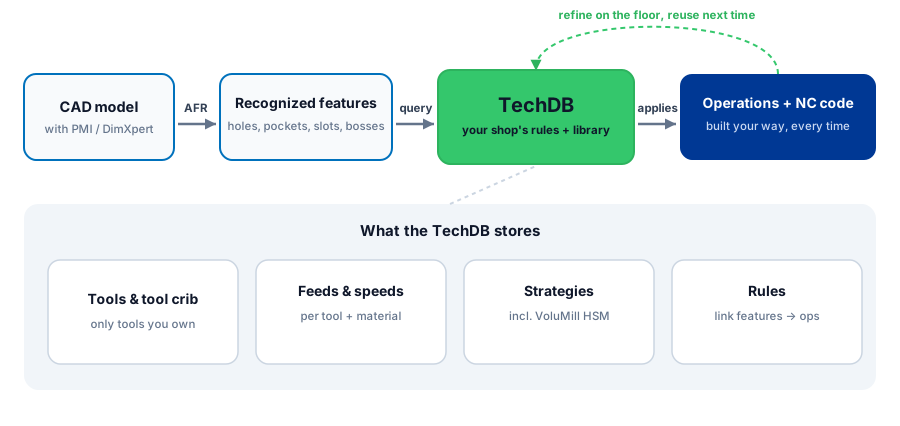
The TechDB (Technology Database) is the rules engine and library behind SOLIDWORKS CAM. It stores your shop's tools, feeds and speeds, machining strategies, and the rules that link a recognized feature to the right operation. When SOLIDWORKS CAM recognizes a feature, it queries the TechDB and programs that operation automatically, the way your shop already runs it. So programming repeats instead of starting from scratch.
Knowledge-Based Machining in plain terms
Knowledge-based machining captures proven manufacturing knowledge once and reuses it automatically. In a traditional CAM workflow, the programmer makes every decision by hand for every feature on every part. In SOLIDWORKS CAM, the system recognizes machinable features, then pulls the matching strategy out of the TechDB. The result is a first-pass program built from your standards before you touch a single operation.
This matters most on the work that repeats. Job shops rarely make the exact same part twice, but they cut the same kinds of features constantly. Holes, slots, pockets, faces, bosses, and chamfers show up across thousands of unrelated jobs. The advantage lands at the feature level, not the part level. The bracket may be new, but the 0.500 reamed hole is not.
Automatic Feature Recognition feeds the rules engine
None of this fires until the software knows what it is looking at. Automatic Feature Recognition (AFR) reads the solid model and identifies machinable features, more than twenty types of prismatic geometry such as holes, pockets, slots, bosses, and chamfers, without you sketching a thing. Each recognized feature becomes the key the TechDB looks up to decide which operations, tools, and parameters apply. Better recognition means more of the part gets programmed automatically.
The honest caveat: AFR is strongest on prismatic, machinable geometry. Highly organic surfaces, lollipop undercuts, and unusual freeform shapes often need interactive feature definition, where you tell the software what the feature is by hand. On the prismatic work that fills most milling and hole-making job queues, AFR carries the load, and that is precisely the work a TechDB pays off on.
Rules-based machining vs tolerance-based machining
SOLIDWORKS CAM applies your knowledge two ways, and they work together.
Rules-based machining uses conditions you define in the TechDB. A rule might say any hole between 0.400 and 0.510 inch, deeper than three diameters, gets center drilled, drilled, then peck drilled with a specific tool list. When a matching feature appears, the rule fires and the operations build themselves. You set the logic once and it scales across every job. The conditions come from you, so the database only ever makes calls your shop already stands behind.
Tolerance-based machining reads the product and manufacturing information (PMI) carried on the model, the dimensions, tolerances, GD&T, and surface finish callouts, and adjusts the strategy to hit them. A hole called out loose gets a drill. The same nominal hole with a tight band and a fine finish callout gets drilled, then bored or reamed. Hand it an asymmetric tolerance and it resolves the upper and lower limits to the mean and cuts to that target rather than to nominal. If engineering tightens a callout on the next revision, the strategy updates to suit instead of leaving you to catch it by eye.
The catch is that tolerance-based machining only sees what is annotated in the model. It needs DimXpert or SOLIDWORKS MBD data on the part, not tolerances that live only on a 2D drawing. A model with no PMI gives the software nothing to read, and it falls back to your rules. Shops that already practice model-based definition get the most out of this; shops that do not should treat annotating the critical features as part of the setup.
| Aspect | Rules-based machining | Tolerance-based machining |
|---|---|---|
| Trigger | Feature size, type, and depth conditions you define | Tolerance and finish callouts on the model |
| Decides | Which operations and tools to apply | Whether to add finishing passes to hold the spec |
| Best for | Standardizing how every feature class is cut | Reacting to revisions and tight callouts automatically |
| Needs | Well-built rules in the TechDB | PMI on the model via DimXpert or MBD |
What the TechDB actually stores
The TechDB is more than a tool crib. It holds the connected pieces that make a program:
- Tools and tool crib data: cutters, holders, diameters, flute counts, and the inventory each machine actually carries.
- Feeds and speeds: cutting parameters tied to tool and material combinations, so a 0.250 carbide endmill in 6061 runs different numbers than the same tool in 17-4.
- Strategies and operations: the sequence of operations mapped to each feature type, including roughing and finishing approaches such as VoluMill high-speed toolpaths.
- Rules and conditions: the logic linking recognized features to the strategies above.
- Machine and material data: definitions that let the same part program differently across a mill, a lathe, or a mill-turn.
Because these are linked, one good decision propagates. Set the correct feed for a tool in a material once, and every operation that calls that combination inherits it.
Not sure where to start when the knowledge you want in the TechDB is scattered across process sheets, setup books, and the feed cards taped inside the machine doors? The first build is the hard part, and it is mostly a matter of moving what your shop already knows into a structure the software can query.
Get a Quote
Building your TechDB from existing process sheets
Every shop already owns the knowledge that belongs in a TechDB. It is sitting in process sheets, setup books, the senior programmer's habits, and the feed and speed cards taped inside the machine doors. The job is to move that knowledge into the database in a structured way.
A practical build looks like this:
- Start with the default TechDB. SOLIDWORKS CAM ships with a populated database. Treat it as a starting point, not the finished product. The defaults are generic.
- Load your real tools. Enter the cutters and holders your machines actually run, organized into tool cribs that mirror your setups. The software should never pick a tool you do not own.
- Enter your proven feeds and speeds. Pull the numbers off your process sheets for the material and tool pairs you run most. These are the numbers your operators trust.
- Codify your strategies. For each common feature class, define the operation sequence your best programmer would build by hand.
- Write rules for the repeat work. Capture the conditions that decide which strategy applies, so the system makes the same call your lead would.
- Refine as you go. Every time you improve a program on the floor, push that improvement back into the TechDB so the next part inherits it.
The first build takes effort. That is the honest part of the pitch. The payoff is that the work compounds.
Why the TechDB compounds
This is the core reason knowledge based machining is worth the setup. A standard CAM seat does the same amount of work on part one thousand as it did on part one. The TechDB does not. Every refinement you feed back in raises the quality of the next first-pass program. Over months, more of your features get programmed correctly on the first generation, you spend less time fixing operations by hand, and the programs come out consistent regardless of who runs the seat. I have seen a shop feed one corrected speed for a 0.250 carbide endmill in 17-4 back into the database after a chatter problem, and from that point every program that called that tool and material inherited the fix automatically, instead of the next programmer rediscovering the same bad numbers three jobs later. A newer programmer leaning on a mature TechDB produces work that reflects your best practices, not their experience level. Faster cycle time on programming and tighter consistency on the floor are the two payoffs that keep growing.
Shared databases for multi-seat shops
For a single seat, the TechDB can run on a local database. For shops with multiple programmers, the better setup is a shared TechDB on Microsoft SQL Server. A shared SQL database means every seat reads and writes the same tools, feeds, speeds, and rules. One programmer's improvement becomes everyone's standard immediately, and you avoid the drift that happens when each seat keeps its own private copy. It also gives IT a single database to back up and maintain. If you run more than two or three seats, plan for the shared SQL approach from the start.
The TechDB transfers up to CAMWorks
SOLIDWORKS CAM is powered by the same engine as CAMWorks, and the TechDB carries between them. The knowledge you build in SOLIDWORKS CAM transfers up to CAMWorks, so a shop that outgrows the embedded toolset and moves to full CAMWorks for heavier multi-axis or mill-turn work does not start over. Your tools, strategies, and rules come along. That protects the investment you make building the database today. If you are weighing the two, the SOLIDWORKS CAM vs CAMWorks vs Mastercam comparison lays out where each one fits.
Getting the first TechDB built
The hardest part of knowledge-based machining is the first database, because it means turning process sheets, tool lists, and feed-and-speed cards into structured rules instead of tribal knowledge that walks out the door at retirement. The work that pays off is concrete: load only the tools your machines actually run, enter the feeds your operators already trust, codify the operation sequence your lead programmer would build by hand, then stand it on a shared SQL configuration if more than two or three seats need it. Morphos 3D is an authorized SOLIDWORKS reseller if you want a starting point scoped from the process sheets you already have rather than the generic defaults.
Where to go next
The TechDB sits at the center of how SOLIDWORKS CAM automates programming, but it works with the rest of the toolset. To go deeper, see SOLIDWORKS CAM for the overview, post-processors for clean G-code output, Standard vs Professional for capability tiers, and 5-axis and 3+2 machining if your work is heading that direction.