
Ask a room full of shops which CAM package they need and half of them will answer with a brand name before they have said a word about what they actually cut. CAMWorks sounds like the serious choice and SOLIDWORKS CAM sounds like the starter kit, and that instinct costs shops money in both directions: some pay for CAMWorks Premium to protect against 5-axis work they will never run, others try to force true simultaneous machining out of a tier that was never built to do it. The recommendation that actually holds up has nothing to do with which name sounds more advanced and everything to do with what your machines do on a Tuesday. Here is how a VAR that also runs CNC actually walks a shop through the decision.
Should your shop choose CAMWorks or SOLIDWORKS CAM?
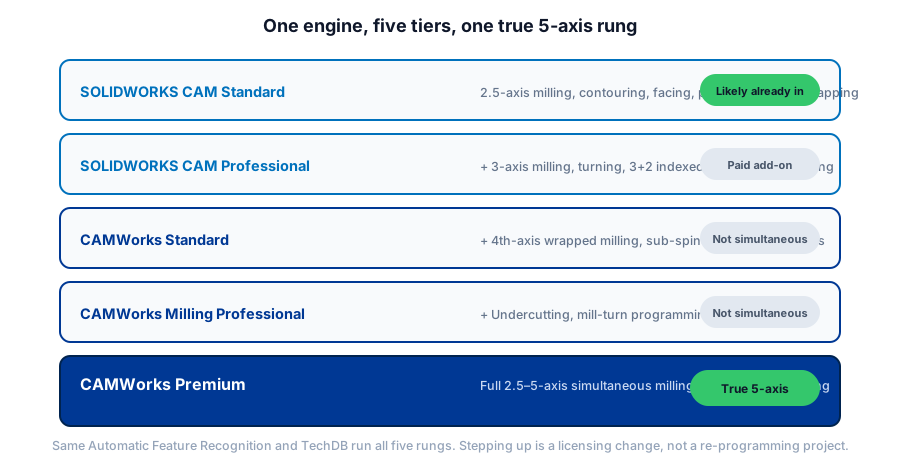
SOLIDWORKS CAM and CAMWorks share one engine at different levels. SOLIDWORKS CAM Standard, likely already included in your SOLIDWORKS subscription, covers 2.5-axis milling. SOLIDWORKS CAM Professional is a paid step up to 3-axis, turning, and 3+2 indexed positioning. CAMWorks then scales through its own tiers, Standard, Milling Professional, and Premium, and only Premium reaches true simultaneous 5-axis machining. Recommend based on what your machines actually do, not the tier name.
The tier ladder, in one table
| Tier | Cost | Capability |
|---|---|---|
| SOLIDWORKS CAM Standard | Included with active SOLIDWORKS Subscription | 2.5-axis milling, contouring, facing, pocketing, drilling, tapping |
| SOLIDWORKS CAM Professional | Paid upgrade | Adds 3-axis milling, turning, 3+2 indexed positioning, assembly machining |
| CAMWorks Standard | Separate CAMWorks license | Adds 4th-axis wrapped milling, sub-spindle control for lathes |
| CAMWorks Milling Professional | Separate CAMWorks license | Adds undercutting, mill-turn programming |
| CAMWorks Premium | Separate CAMWorks license | Only tier with true simultaneous 5-axis milling plus full mill-turn |
Check what you already have before you buy anything
SOLIDWORKS CAM Standard rides along with an active SOLIDWORKS Subscription Service rather than showing up as its own line item, which means a shop that has paid its subscription every year may already own 2.5-axis milling, contouring, facing, pocketing, drilling, and tapping and simply never turned it on. I have sat across the table from a shop owner who had priced out a third-party CAM package for exactly that capability, and the honest recommendation was to close the laptop and open the CAM tab already sitting inside the SOLIDWORKS install. Confirm your exact entitlement against your current order before you assume anything, since the CAD tier boundary can shift between releases, but check first. It is the cheapest step in this entire decision.
SOLIDWORKS CAM Professional: the first real upgrade decision
Once 2.5-axis milling stops covering the work, SOLIDWORKS CAM Professional is the first paid step, and it adds 3-axis milling, turning, 3+2 indexed positional machining, and assembly machining on top of the Standard tier. That covers a genuine majority of shops: parts that need a tilted or rotated setup rather than motion through five axes at once, lathe work, and machining an assembly as a unit instead of part by part. If your next machine purchase is a 3-axis mill or a lathe rather than a 5-axis simultaneous machine, this is very likely the ceiling you actually need, and paying for CAMWorks on top of it buys you nothing you will use.
CAMWorks: three tiers, and only the top one does true 5-axis
This is where the brand-name instinct causes the most expensive mistakes. CAMWorks Standard takes everything in SOLIDWORKS CAM Professional and adds 4th-axis wrapped milling and sub-spindle control for lathes, which is real capability but is not simultaneous 5-axis. CAMWorks Milling Professional adds undercutting and mill-turn programming on top of that, and it still is not simultaneous 5-axis. Only CAMWorks Premium reaches full 2.5-through-5-axis simultaneous milling combined with mill-turn, and it is the single tier built for a part that genuinely needs the tool moving through five axes of motion at once, not indexed into position and then cut.
A lot of buyers assume the CAMWorks name by itself means 5-axis, and it does not. If a rep or a reseller quotes CAMWorks without naming the tier, ask which one, because the gap between Standard and Premium is the gap between a modest step up and the top of the entire product family.
Not sure which CAM tier your actual parts and machines call for?
Get a QuoteWhat a VAR actually recommends
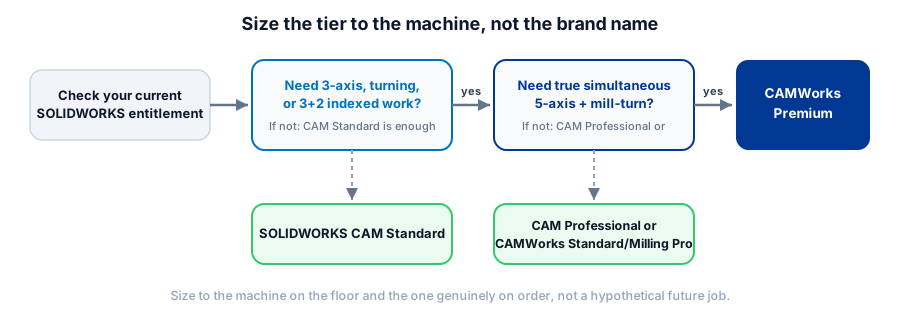
The decision framework is shorter than the tier list makes it look. Ask what your machines do today, not what you might someday buy, and size to that, because the TechDB and Automatic Feature Recognition carry across every tier, so starting smaller and stepping up later is a licensing change, not a re-programming project. Ask what your next machine purchase is actually scheduled to be, since a 5-axis simultaneous mill on order this year justifies Premium today, while a hypothetical 5-axis machine someday does not. And be honest about who is running the program: a shop with one experienced multi-axis programmer can extract real value from Premium, while a shop still building that skill set will get more out of mastering 3+2 positional work first.
If clean, edit-free code on the machines you actually run is the goal, the tier decision is only half the job. See our breakdown of SOLIDWORKS CAM Standard vs Professional for the deeper feature walkthrough, and 5-axis vs 3+2 machining for the distinction that trips up the most buyers before they ever reach the CAMWorks decision at all.
The follow-up question that matters more than the CAM tier
None of these tiers matter if the program that comes out the other end does not run clean on your actual controls. A shop can own CAMWorks Premium and still hand-edit every file if the post-processor was never proven out against the machine sitting on the floor. Before the tier conversation turns into a purchase, get a straight answer on what your post-processor actually needs to do, because that is where a lot of the real time savings from any of these tiers either shows up or quietly disappears.
What this means for your shop
Check your current entitlement first, because you may already own more than you think. Size the CAM tier to the machines you run today and the ones genuinely on order, not a hypothetical future job. Remember the tiers share one engine, so the TechDB and your programming standards move with you if you step up later. And treat the post-processor as part of the same decision, because the CAM tier only pays off once the code it produces actually runs on your machine without a hand edit.
Sizing CAMWorks or SOLIDWORKS CAM for your shop?
Morphos 3D sells and supports both the SOLIDWORKS CAM and CAMWorks family, which means the recommendation is sized to your machines, not to whichever tier carries the higher price. See the full SOLIDWORKS CAM breakdown, compare the wider field including Mastercam, or talk to support about the machines you're actually running.