
Every shop that outgrows shared network folders for CAD files hits the same fork: SOLIDWORKS PDM, running on a server you own, or 3DEXPERIENCE Platform's cloud data management, running on Dassault's infrastructure instead of yours. Vendors on both sides of that fork have a reason to make their answer sound obvious, and neither one is lying exactly, they are just each describing the shop that fits their product. The honest version depends on your internet connection, whether you touch export-controlled work, and who on your shop is actually going to own the vault day to day. Here is what each option really requires, what it really costs, and the questions that decide it.
Should you deploy SOLIDWORKS PDM in the cloud or on premises?
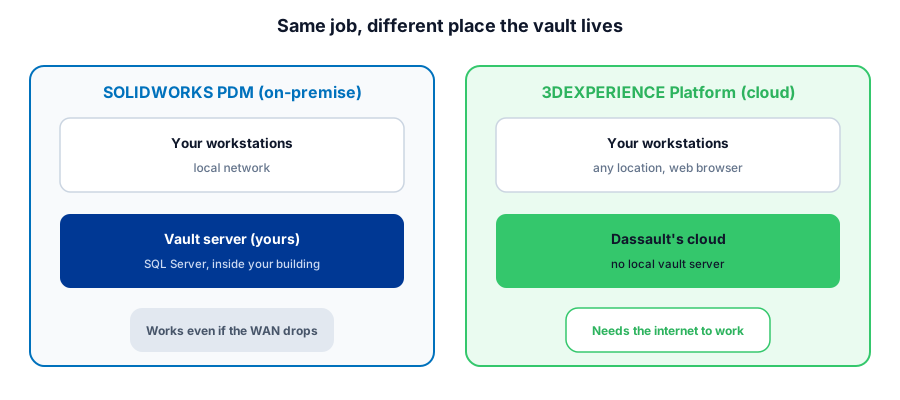
SOLIDWORKS PDM is on-premise software: your files live in a vault on a server you own, running SQL Server. 3DEXPERIENCE Platform is Dassault's cloud data management option, accessed through a browser, with no local vault server required. On-premise total cost of ownership commonly runs 3 to 5 times the sticker price once server hardware, SQL licensing, and ongoing IT maintenance are counted, but cloud does not eliminate IT, it just changes what that person spends their time on. Internet reliability, export control, and who administers the vault decide it more than price alone.
The short version, in a table
| For a machine shop | SOLIDWORKS PDM | 3DEXPERIENCE Platform |
|---|---|---|
| Architecture | On-premise vault on a server you own | 100 percent cloud, browser-based |
| Database engine | SQL Server, Express or full | Managed by Dassault, nothing to provision |
| Total cost of ownership | Commonly 3 to 5 times sticker price once hardware, SQL licensing, and IT hours are counted | No server to buy, but configuration and administration are still real ongoing work |
| Internet dependency | Works on the local network even if the WAN drops | Vault access requires a working internet connection |
| Export-controlled work | Vault stays physically inside a facility your IT fully owns | Depends on Dassault's cloud compliance posture for your situation |
| Multi-site or remote access | Needs extra infrastructure to reach beyond the local network | Reachable from any browser, any location, by default |
| Best fit | Single site, spotty internet, or export-controlled work | Multi-site teams, travel, low appetite for owning a SQL Server box |
What SOLIDWORKS PDM actually requires
SOLIDWORKS PDM is a genuinely on-premise product. Your vault runs on a server that has to meet its own operating system, memory, and processor requirements, and that server runs on SQL Server, the database engine underneath every check-in, check-out, and revision your shop touches. PDM Standard uses SQL Server Express, which is free but caps database size and limits performance as the vault grows, and its check-in and check-out workflow is largely fixed out of the box. PDM Professional runs on full SQL Server and adds configurable, multi-step workflows, where a document's permissions and metadata change automatically as it moves through review and release states, which is the feature a shop with a real engineering-change process actually uses. See the full SOLIDWORKS PDM breakdown for the rest of what each tier includes.
What the cloud option actually is
3DEXPERIENCE Platform is the other side of the fork, and it is a genuinely different architecture, not just SOLIDWORKS PDM hosted somewhere else. It is 100 percent cloud: your CAD data goes directly to Dassault's cloud infrastructure over a secure connection, accessed through a web browser, and there is no local vault server to provision, patch, or eventually replace. That also means it is reachable from a laptop at a customer site or a second building the same way it is reachable from the shop floor, which on-premise PDM was never built to do without extra infrastructure of its own. See the 3DEXPERIENCE Platform page for the full picture beyond data management.
Not sure whether cloud or on-premise PDM actually fits how your shop runs?
Get a QuoteThe real cost comparison
The sticker price of SOLIDWORKS PDM is never the real number. Once you count server hardware, a SQL Server license if you outgrow the free Express tier, implementation time, and the ongoing IT hours to keep the box patched and backed up, on-premise total cost of ownership commonly runs 3 to 5 times the initial software cost, and that is before the periodic server-replacement or migration project every few years. Cloud PDM avoids buying and maintaining that infrastructure outright, and updates roll out from the vendor instead of landing on your IT person's to-do list. What cloud does not do is eliminate IT from the equation. Configuring workflows, managing users and permissions, and administering the platform is still real, ongoing work, so the honest framing is that cloud shifts the IT burden away from hardware and toward configuration, it does not make the job disappear.
The question that actually decides it for a shop
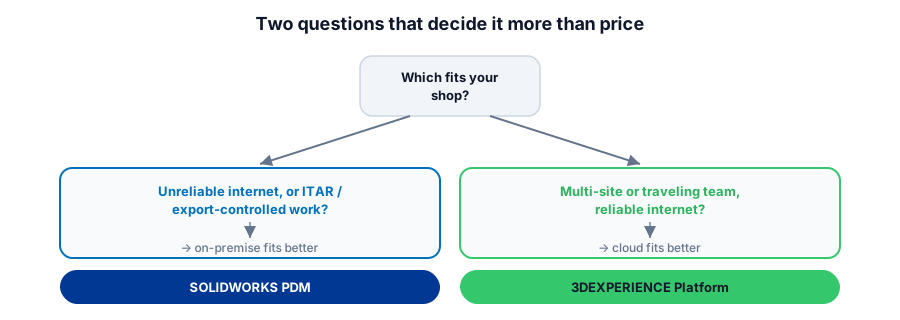
Price rarely settles this on its own. Start with your internet: a shop on a rural or unreliable connection loses vault access entirely when the WAN drops if the vault lives in the cloud, while an on-premise vault keeps working on the local network regardless of what the outside connection is doing. If you cut parts under ITAR or similar export controls, on-premise keeps the vault physically inside a facility your own IT fully owns, which is a real compliance argument a lot of shops in that position take seriously rather than treat as a preference. If your shop is spread across a second building, a field service group, or programmers who travel to customer sites, cloud's anywhere-access is the actual point, not a nice-to-have. And be honest about who owns the vault day to day: a shop with no one who wants to own a SQL Server box is a poor fit for on-premise no matter how attractive the local control sounds on paper.
What this means for your shop
If your shop runs on one site, has spotty internet, or handles export-controlled work, on-premise SOLIDWORKS PDM is the safer default even accounting for the real cost of the server behind it. If your shop is spread across locations, travels, or simply has no appetite for owning a SQL Server box, 3DEXPERIENCE cloud PDM removes a real burden, as long as you go in knowing configuration and administration are still somebody's job. Either way, price the total cost, not the sticker price, before you decide, and get the export-control question answered in writing if it applies to your work rather than assuming either option settles it by default.
Weighing cloud vs on-premise PDM for your shop?
Morphos 3D sells and supports both SOLIDWORKS PDM and 3DEXPERIENCE Platform, which means the recommendation is sized to your internet, your compliance needs, and who actually runs your vault, not to which one has the newer pitch. See how PDM fits alongside DELMIAWorks ERP, check what SOLIDWORKS licensing costs, or talk to support about the setup your shop is running today.