
Somewhere in every SOLIDWORKS quote sits a checkbox that decides more than most shops realize: Standalone or Network. Pick wrong and you either bought four extra seats that sit idle nine hours out of every ten-hour shift, or you built a shared pool for a two-person design office that never needed to share anything in the first place. The two license types solve genuinely different problems. The honest answer to which one your shop needs has almost nothing to do with which one sounds more modern and everything to do with how many people actually touch SOLIDWORKS on a given day. This is a straight read on how each one works, what License Borrowing is actually for, and the math that tells you which one is yours.
Should you use standalone or network SOLIDWORKS licensing?
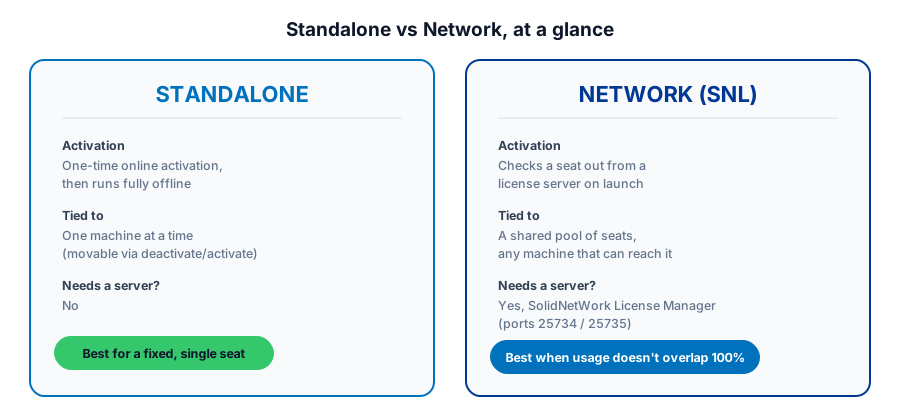
A Standalone license activates on one machine through the SOLIDWORKS Activation Manager and, once activated, runs fully offline from then on. A Network license, called SolidNetWork License or SNL, lives on a license server your machines check a seat out from when SOLIDWORKS opens and return the instant it closes, so a shop can own fewer seats than it has people as long as usage never fully overlaps. Standalone suits a fixed seat that never moves; Network suits a team large enough that not everyone needs SOLIDWORKS open at the same moment.
The short version, in a table
| For a machine shop | Standalone | Network (SNL) |
|---|---|---|
| Activation | Activate/Deactivate via SOLIDWORKS Activation Manager, one machine at a time | SolidNetWork License Manager server issues seats to clients on request |
| Offline use | Runs fully offline once activated | Needs the license server reachable to check out a seat |
| Seat model | One seat, one machine | Shared pool; fewer seats than people as long as usage does not fully overlap |
| Moving the license | Deactivate and reactivate on a different machine | Not applicable, the server manages every seat centrally |
| Pooling restrictions | Not applicable | Users must share the same legal entity and global territory: Americas, Europe, Japan, or Asia-Pacific |
| Best fit | A fixed seat that never moves, one person per machine | A team large enough that not everyone needs SOLIDWORKS open at once |
What a Standalone license actually locks you into
A Standalone license runs through what SOLIDWORKS calls an Activate/Deactivate mechanism. You activate the software on a machine once, which needs an internet or email connection for that single step, and after that you do not need to be online to keep using it. The license stays tied to that machine, but it is not permanently welded there. You can deactivate it and activate it again on a laptop, a home machine, a replacement workstation, whatever the case, as long as only one copy is active at any moment. For a shop with a fixed CAD seat that one person sits at every day, that is the entire story, and it is genuinely the simpler of the two options.
I have watched a growing shop buy five Standalone seats because nobody walked them through the alternative, and by the third month, four of those five sat idle for most of a ten-hour shift while the fifth got passed between two programmers who were never scheduled at the same time. That is not a Standalone problem exactly, it is a fit problem. Before you sign a quote, ask the first real question: does every seat you are about to buy belong to one specific person on one specific machine, or does your actual usage pattern look more like a rotation?
How Network licensing actually shares seats
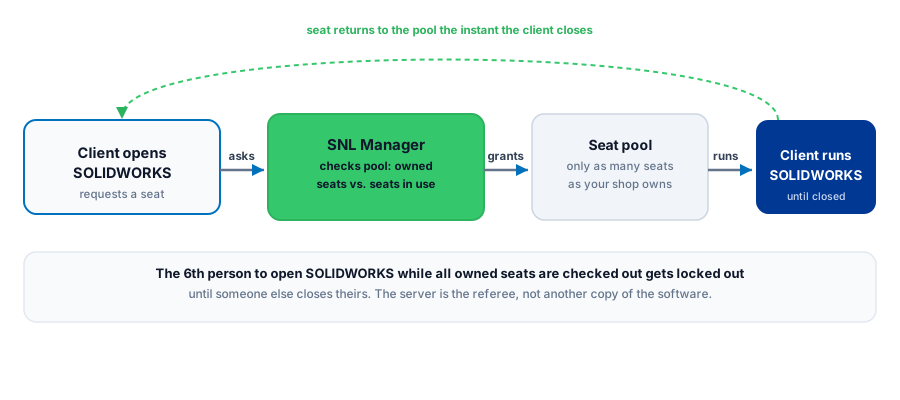
Network licensing runs on a client/server model: the SolidNetWork License Manager sits on a physical or virtual server your shop's machines can reach, and it tracks how many seats are checked out against how many you own. Launch SOLIDWORKS and the client asks the server for a seat; close SOLIDWORKS and that seat returns to the pool immediately for the next person. Nearly every SOLIDWORKS product can be added to an SNL pool, and a shop can run some machines Standalone and pull the rest from the shared pool in the same environment.
Two details catch shops that skip the fine print. First, the license manager itself has to be the same year or newer than every client it serves. The common upgrade-order mistake is pushing design seats to a new release before updating the license manager, and then nobody can check a seat out Monday morning. Second, Network pooling has real boundaries: users sharing a pool must belong to the same legal corporate entity and sit in the same global territory, Americas, Europe, Japan, or Asia-Pacific, with at least one SNL server license required in every country that has users. A multi-plant company assuming it can pool licenses freely across a border or across two legal entities is assuming wrong, and that is exactly the kind of detail a VAR should catch before the quote goes out, not after the server is already running.
Not sure whether your shop's usage actually justifies a Network license and the server that comes with it?
Get a QuoteLicense Borrowing: the feature most shops don't know exists
If your seats live in a Network pool, License Borrowing lets a specific machine check a seat out of that pool and keep it working offline for a stretch of time, up to 30 days by default, though a system administrator can adjust that window. It exists for exactly the situation that used to force shops into buying an extra Standalone seat they barely needed: the programmer taking a laptop to a customer site, the trade show demo, the week of working from home during a machine install. Borrow the seat, take the laptop off the network, and the software keeps running until either the borrow period ends or you return it early.
The honest caveat, and it is a real failure mode, not a hypothetical one: if the borrowing machine dies, gets reimaged, or otherwise never checks the seat back in, that license can sit stuck in borrowed status against your pool until an administrator force-returns it from the server side. Treat borrowing as a deliberate checkout with a return step, the same way you would treat a tool crib, not a switch you flip and forget.
Do you actually need a Network license?
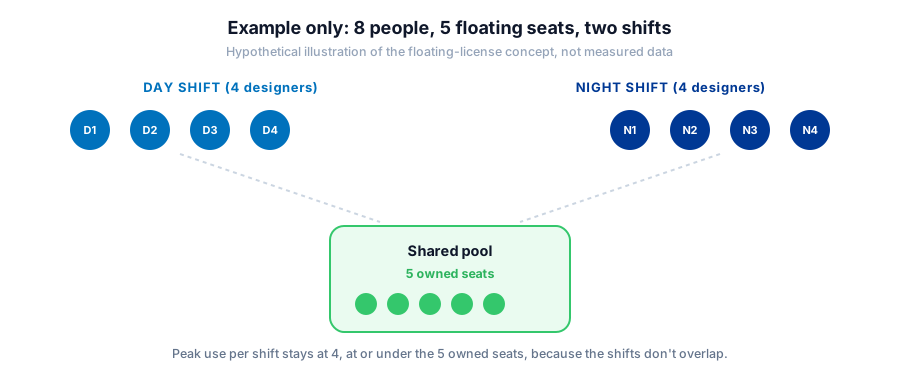
This is where I will talk you out of the upsell if the math does not support it. If every seat you are buying belongs to one person on one machine, every single day, Network licensing buys you nothing but a server to maintain. A two-person design office should just buy two Standalone seats and skip the license manager entirely, because there is no pool worth building for two people who both need SOLIDWORKS open all day anyway. Network earns its keep the moment your usage genuinely overlaps less than 100 percent. A multi-shift programming room where day shift hands off to night shift, an estimating crew that dips into SOLIDWORKS a few times a day rather than continuously, or a growing shop where headcount is climbing faster than simultaneous SOLIDWORKS use, all fit the pattern. Buy for the peak number of people who are ever open at once, not for your total headcount. That number is almost always smaller than shops assume until someone actually measures it.
The IT overhead nobody puts in the quote
A Network license is not free to operate just because the per-seat math looks better. Someone has to stand up the SolidNetWork License Manager on a real machine, keep two firewall ports, 25734 and 25735, open for it, and remember to update the manager itself before pushing any client to a newer release. None of that is difficult for a shop with even part-time IT support, but a shop with no IT staff at all should weigh that overhead honestly against the per-seat savings. Paying more per Standalone seat and never touching a license server can be the cheaper decision once you count the hours someone spends babysitting a service that quietly breaks every time an upgrade happens out of order.
What this means for your shop
Figure out your actual peak concurrent usage before you pick a license type, not your headcount and not your gut feeling. If that peak is close to your total user count, Standalone is simpler and there is no shame in simpler. If it is meaningfully lower, Network licensing plus License Borrowing for the machines that leave the building is the setup that stops you from paying for idle seats. Either way, get the legal-entity and territory rules straight before you assume you can pool across locations, and make updating the license manager part of your upgrade checklist, not an afterthought you discover on the first Monday it breaks.
Figuring out licensing for an upgrade or a growing shop?
Morphos 3D sells and supports SOLIDWORKS for manufacturers, which means sizing licensing to how your shop actually runs, not to what sounds impressive on a quote. See how licensing plays into what SOLIDWORKS actually costs, compare it against a SOLIDWORKS CAM edition decision, or talk to support about the setup your shop is running today.