
Every workstation refresh conversation with a shop starts the same way: someone asks whether the machine that has run fine for three years can handle the new release, and the honest answer this year is that the operating system question comes before the parts-per-second question. SOLIDWORKS 2026 draws a hard line at Windows 11, raises the RAM floor, and shifts what actually matters in a CPU, and none of that shows up on a spec sheet the way a shop needs it explained. This is the plain read on what to check before you upgrade, what to actually buy, and the one mistake that wastes money whichever direction you make it.
What hardware and Windows version does SOLIDWORKS 2026 need?
SOLIDWORKS 2026 runs only on Windows 11 Professional or Enterprise, 64-bit, with no Windows 10 path. RAM minimum is now 32GB, and CPU clock speed matters more than core count for day-to-day modeling, though Simulation flips that and wants more cores. GPU needs scale with assembly size, an RTX 2000 Blackwell-class card covers most job-shop work, and a Blended workstation running SOLIDWORKS CAM alongside modeling should be sized for both jobs, not just CAD.
SOLIDWORKS 2026 requires Windows 11, full stop
Start here, because it is the one item on this list that is not a performance question, it is a go or no-go question. SOLIDWORKS 2026 is supported only on Windows 11 Professional or Enterprise, 64-bit. There is no Windows 10 option for this release. I have seen a shop try to install 2026 the night before a deadline on a workstation that had quietly stayed on Windows 10 because nobody wanted to touch a machine that worked, and the fix turned into an afternoon of scrambling that a five-minute check the week before would have avoided. If any of your seats, especially ones tucked next to a machine or a PDM vault server that nobody likes rebooting, are still on Windows 10, that upgrade needs to happen on your schedule, not on the same day as a job that is already running late.
The CPU: modeling wants clock speed, Simulation wants cores
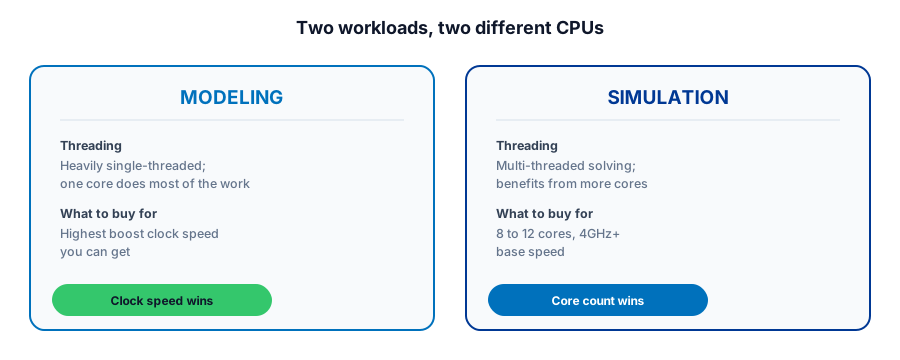
SOLIDWORKS lists a 3.3GHz or faster processor, an Intel Core i5 or i7 class chip or the AMD equivalent, as the floor, but the number that actually matters for a shop is subtler than the minimum. Day-to-day modeling in SOLIDWORKS is heavily single-threaded, meaning one core carries most of the load while you sketch, feature, and rebuild, so a workstation with a high boost clock beats a machine with more cores at a lower speed for the modeling work most seats do all day. If you also run SOLIDWORKS Simulation regularly, that advice flips, because solving genuinely benefits from more cores, with 8 to 12 cores at 4GHz or better base speed as a reasonable target. A shop buying one workstation profile for every seat is very likely overpaying for the modeling-only users and underpowering the one person running simulation studies.
RAM: 32GB is the new floor, size the rest to your biggest assembly
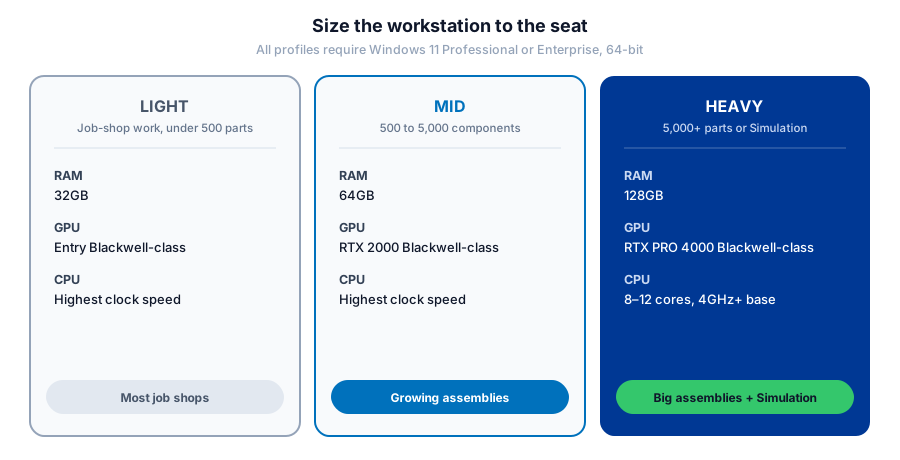
The 2026 minimum moved to 32GB, up from prior releases, and treating that number as the target rather than the floor is the most common under-spec mistake a shop makes. The right number tracks assembly size: under 500 components generally runs fine on 32GB, 500 to 5,000 components calls for 64GB, and anything past 5,000 components, or a seat that runs Simulation alongside modeling, wants 128GB. Buy for the largest assembly on your roadmap, not the part you happen to be modeling this week, because RAM is one of the cheaper upgrades to get right up front and one of the more disruptive ones to discover you skimped on mid-project.
Not sure which workstation spec actually fits the seats in your shop?
Get a QuoteGPU: don't overspend, but don't starve it either
An NVIDIA RTX 2000 Blackwell-class card is genuinely sufficient for assemblies up to around 1,000 components, which covers a large share of job-shop work, brackets, fixtures, and single-machine parts that never grow into a thousand-piece assembly. Step up to an RTX PRO 4000 Blackwell-class card once you are regularly working assemblies past 5,000 parts or driving a high-resolution display, since that is where the extra headroom actually gets used instead of sitting idle. If your shop touches SOLIDWORKS Visualize for renders, keep in mind it specifically needs at least 4GB of GPU memory to enable GPU-accelerated rendering, so a bargain card that skimps on memory can quietly leave that feature running on the CPU instead.
Storage, and the workstation that also drives CAM
Storage guidance is the least dramatic item here: a solid-state drive over 250GB with roughly 10 percent of capacity kept free is the standard recommendation, and there is little reason to run SOLIDWORKS on a spinning disk in 2026. The detail worth catching before you spec anything is the machine that does more than model. A workstation that also runs SOLIDWORKS CAM, generating toolpaths, running verification, and posting NC code, is carrying a second real workload on top of CAD, not a light add-on, and specifying it like a design-only seat is how a shop ends up with a programming station that bogs down at exactly the moment it is loading a big toolpath simulation before a job needs to run.
What this means for your shop
Confirm Windows 11 readiness first, since it is the one non-negotiable on this list and the cheapest to fix early. Buy CPU clock speed for modeling seats and core count for anyone running Simulation regularly, rather than one spec for the whole shop. Size RAM to the biggest assembly you expect to open, not the one on your screen today. Match the GPU to actual component counts instead of the flagship card, and treat any workstation that also drives CAM as a two-job machine when you spec it. None of this is exotic, it is just specific enough that a generic hardware article rarely gets it right for a shop.
Planning a SOLIDWORKS 2026 workstation refresh?
Morphos 3D sells and supports SOLIDWORKS for manufacturers, which means sizing hardware to the seat, CAD-only, CAM-heavy, or Simulation, rather than one spec for everyone. See what's actually new in SOLIDWORKS 2026, check what the licensing side costs, or talk to support about the seats you're running today.