
Every shop owner gets the same pitch this year from somewhere: there is AI in your CAD now, and it is going to change how you work. SOLIDWORKS has put real names and real release dates behind that pitch in the form of three AI agents, Aura, Leo, and Marie, that Dassault calls Virtual Companions. Two of them, Aura and Leo, now run inside SOLIDWORKS 2026 itself through a new SOLIDWORKS Labs (Beta) tab as of the SP1 and FD01 update, so this is no longer a keynote you watch once and forget. The useful question for a machine shop is not whether the agents are real, because they are, but which one does work you actually have, what each one will not touch, and where your proprietary models go the moment you prompt it. This is a straight read on all three.
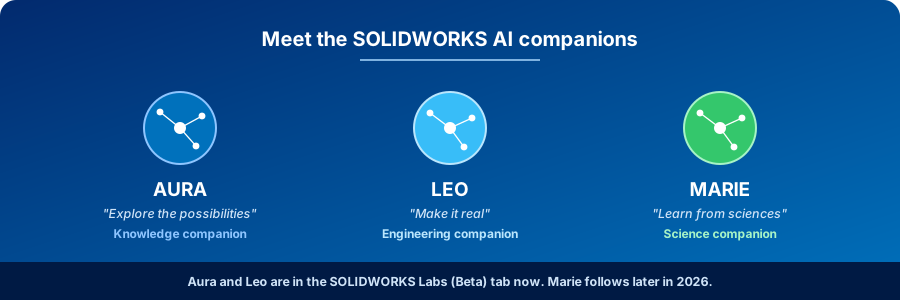
What are the SOLIDWORKS AI agents?
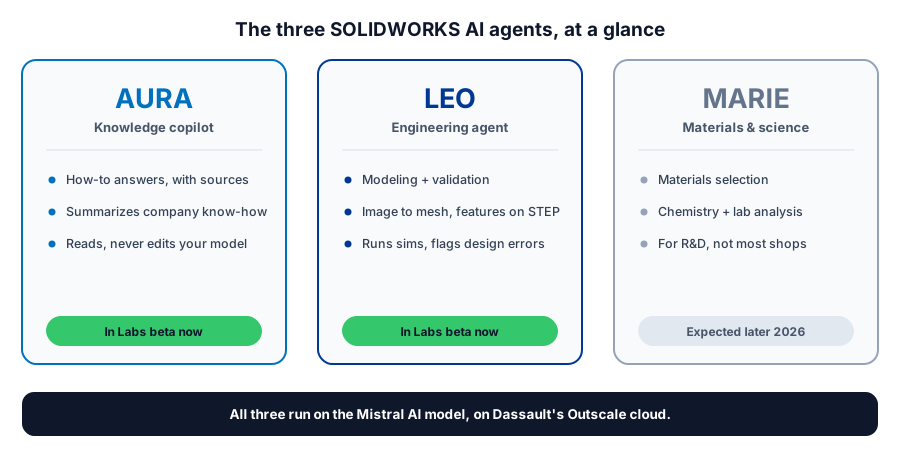
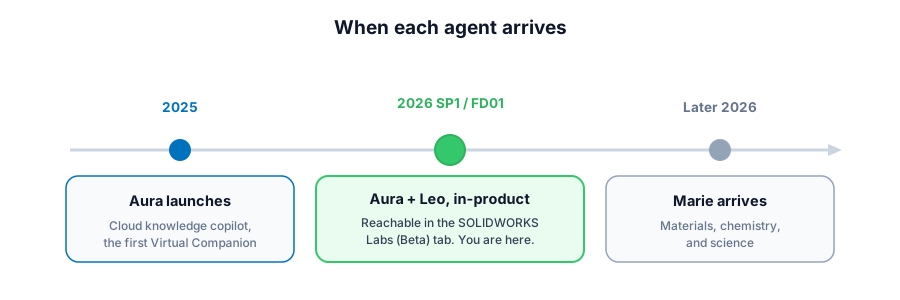
SOLIDWORKS has three AI agents, branded Virtual Companions. Aura is the knowledge copilot that answers how-to questions and summarizes community and company knowledge with source links. Leo is the engineering agent, aimed at modeling, validation, simulation, and manufacturing. Marie handles materials, chemistry, and science. Aura and Leo are reachable now inside SOLIDWORKS 2026 through the SOLIDWORKS Labs (Beta) tab in the SP1 and FD01 release, with Marie following later in 2026. All three run on the Mistral AI model on Dassault's Outscale cloud.
Three agents, three jobs
The reason there are three agents instead of one is that each was built to answer the way a different person on a design team would. Ask the same question of all three and you get three answers shaped by three specialties, the way a programmer, a stress engineer, and a materials guy would each tell you something different about the same part. That split is worth understanding before you turn any of them on, because two of these agents earn their place in a contract shop and one of them mostly does not.
Aura, the one to actually try first
Aura is the oldest of the three, shipped back in 2025, and it is the agent most shops will get value from on day one because it does the least glamorous job well. It is a knowledge copilot: you ask how to do something in SOLIDWORKS, or what a setting actually does, or where a workflow is documented, and it answers in a sentence or two with links back to the community posts, wikis, and threads it pulled from instead of making you dig through them yourself. It also reaches into your company's own stored knowledge, so the tribal wisdom that normally lives in one veteran's head becomes something a new hire can simply ask about. For a shop that quietly loses hours to people hunting for how somebody did a thing last time, that is the real win, and it carries the lowest risk of anything here because Aura is reading and summarizing, never changing your model.
Leo, the engineering agent worth watching
Leo is the one the keynotes were really about, built for engineering, mechanics, simulation, and, in Dassault's own framing, taking products to manufacture. In the demonstrations it generated assembly structures from a prompt, converted an image into a mesh, added parametric features onto an imported STEP file, ran simulation studies, evaluated an assembly, and flagged design errors to resolve. That is a long list, and the honest caveat is that a polished stage demo and a beta button working on your own messy production data are not the same thing, so treat Leo as something to test on a scrap project rather than to schedule real work around. Where it points still matters for a shop, though, because cleaning up imported geometry and getting a first simulation read without waiting on a specialist is exactly the front-of-pipeline grunt work that drags a quote out.
Marie, the one most shops can skip for now
Marie rounds out the trio for materials, chemistry, and science, with skills aimed at materials selection, hypothesis work, and lab-style analysis. If you run an R&D or materials function it will be worth a look when it arrives later in 2026, but for a contract shop cutting other people's prints to spec, Marie is the agent you can comfortably ignore while you get value from the other two. Knowing that up front saves you from feeling like you are behind for not using all three.
Where the SOLIDWORKS AI agents actually live now
The detail that changed recently, and the reason this is worth your attention today rather than next year, is access. Aura and Leo are no longer only a cloud demo, because the SOLIDWORKS 2026 SP1 and FD01 update added a SOLIDWORKS Labs (Beta) tab inside SOLIDWORKS Design, and that tab is where you reach both agents from within the product you already open every morning. Access runs through the 3DEXPERIENCE platform, so signing in and a live internet connection are part of the deal, since the agents run in the cloud rather than on your workstation. The word beta is doing real work in that sentence, so plan for rough edges, behavior that shifts between updates, and capabilities narrower than the launch reel. Marie is not in the tab yet and is expected later in 2026.
Trying to sort which SOLIDWORKS 2026 AI features are worth turning on for your shop, and which are still just a demo?
Get a QuoteThe data question every shop should ask
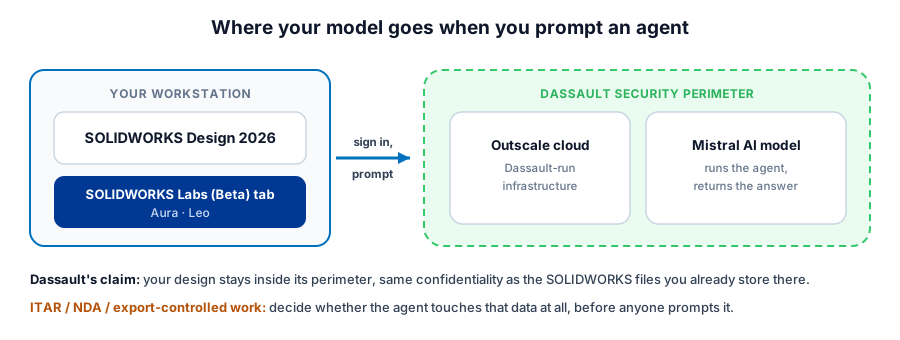
Before you prompt any cloud agent with a customer's part, ask the question that matters more than any feature on the list: where does the model go? Dassault's answer is that the three agents run on the Mistral AI foundational model hosted on its own Outscale cloud, and that your designs stay inside Dassault's security perimeter under the same confidentiality terms as the SOLIDWORKS files you already store with them. That is a meaningful answer, because it is not the same bargain as pasting proprietary geometry into a public chatbot that learns from whatever you feed it. It is still worth reading the terms yourself, and worth a real conversation if you cut parts under ITAR, a customer NDA, or anything export-controlled, because in those shops the right call might be to keep the agent away from that data entirely no matter whose cloud it sits on. The point is not that the cloud is unsafe, it is that this is a decision you should make on purpose rather than discover by accident after the fact.
What the agents will not do on your floor
It is worth being blunt about the limits, because the gap between a CAD prompt and a running spindle is where shops lose money betting on the wrong thing. None of these agents writes or proves out the post-processor for your exact control, none of them knows the backlash on the old Haas in the corner or the fixture that only one programmer trusts, and none of them will look at posted G-code and tell you it is going to crash before it ever reaches the part. I have watched a shop chase a shiny front-end tool for weeks while the actual bottleneck, a post that was ninety percent right and therefore not safe, sat untouched the whole time. The agents speed up the modeling, the knowledge lookup, and the first simulation read, which is genuinely useful, but the work of turning a good model into clean, edit-free code on your machines still runs through a properly built SOLIDWORKS CAM setup and a tested post, not through a prompt. SOLIDWORKS CEO Manish Kumar said the honest version himself when he called AI the multiplier and the person the value, and that framing holds up the moment you are standing at the control.
What to do about it now
The practical plan is short. Turn Aura on and use it, because a knowledge copilot that reads and links back costs you nothing in risk and gives time back the first week. Try Leo on a scrap or internal project so you learn where the beta is honestly useful and where it still wastes your time, but keep it off the critical path of a real job for now. Decide your data line deliberately before anyone prompts an agent with a customer's part, especially under ITAR or an NDA. Leave Marie for later unless materials research is the business you are in. And do not wait on any of it to fix the parts of the pipeline, the posts, the fixtures, and the programming judgment, that these agents were never built to touch. The SOLIDWORKS 2026 agents are a real step, and they pay off for the shop that treats them as sharper tools at the front of the pipeline rather than a replacement for the people running the machines.
Sorting the SOLIDWORKS 2026 AI for a shop?
Morphos 3D sells and supports SOLIDWORKS for manufacturers, which means telling the 2026 AI that changes how you make parts apart from the parts that just demo well. The broader SOLIDWORKS AI in 2026 overview covers the in-product generative features alongside these agents, the SOLIDWORKS Design and SOLIDWORKS CAM pages show where they sit in a real workflow, and support is there when you want a straight answer about your own machines.