
A SOLIDWORKS Demo Test Plan for Your Own Parts
A useful SOLIDWORKS demo test plan defines the source data, requested change, expected drawing and handoff before the session. Record assistance and setup, then separate demonstrated capability from work that still needs an independent pilot.
Teams with an active CAD evaluation who want a focused technical discussion or demonstration.
A guided demonstration does not prove an independent pilot or migration.
Write the SOLIDWORKS demo test plan before the meeting
Start with the decision the demonstration should support. “Show the software” creates an open-ended session, while “show whether this assembly change reaches the drawing and manufacturing package without unresolved references” creates a testable task.
Select data that represents ordinary work and one variation that exposes a known constraint. Include the source model, the relevant drawing, and a short description of the required change. If the files cannot be shared, prepare sanitized data that preserves the relationships being tested, then record what the sanitized case omits.
Agree on the recipient of the final output. A design lead can judge whether the model is maintainable, while manufacturing can judge whether the delivered information supports the next operation. Those are related acceptance conditions, but one person should not silently speak for both roles.
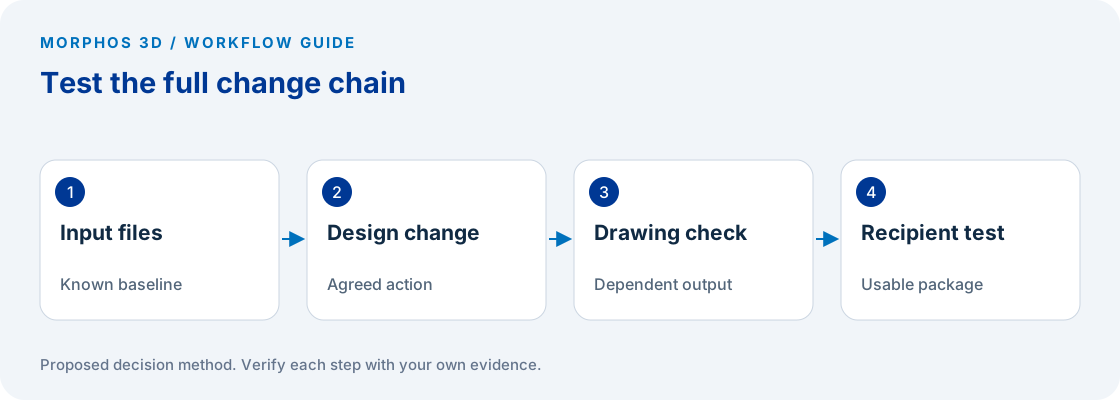
Define the change and its dependent outputs
Choose a change that touches an actual engineering relationship: a mounting pattern, a component position, or a controlled dimension with drawing consequences. State which features and deliverables should change, and identify anything expected to remain unchanged.
Record the starting configuration and file versions before the session. Preserve an untouched copy of the input package. If preparation is required, ask for a written list of what was repaired, substituted, simplified, or recreated, because that effort affects the interpretation of the demonstration.
The test ends after the receiving person inspects the output. Opening a model successfully is one observation. Establishing that the drawing communicates the intended change and that the recipient received the correct package requires additional checks.
Keep conditions comparable and assistance visible
Record the software release, hardware, storage location, opening mode, and any relevant add-ins. These details do not need to become the focus of the meeting, but they should remain attached to the evidence so later comparisons do not mix incompatible conditions.
Separate operator skill from product capability. A specialist completing a task demonstrates one possible workflow; it does not establish how quickly a new user will complete it independently. Record where assistance was needed and use those points to define a training or pilot task.
If timing matters, define the start and stop events before running the task. Include required preparation rather than timing only the final click. Report the observed case without converting one demonstration into a general productivity claim or a guarantee about your entire data set.
Put the method to work
Bring the source files, one required change and the acceptance conditions for the output.
Use the worksheet belowTest review access with the actual recipient role
Have the intended reviewer receive the proposed package, identify the design change, and return a specific observation. If the intended workflow uses browser review, test that route with the planned recipient permissions. The official Share & Markup module describes that review workflow, but it does not replace a test of your recipient's access. SOLIDWORKS Share & Markup learning module.
Ask the reviewer to identify the revision or release reference they are evaluating. A useful comment against an unidentified model can still leave the engineering team uncertain about which change was accepted. Preserve the review response with the file reference and the person authorized to resolve it.
Keep a separate list of commercial and deployment questions. The demonstration can expose the need for an integration or access method, but license entitlement, operating requirements and contractual terms need confirmation for the exact proposed configuration.
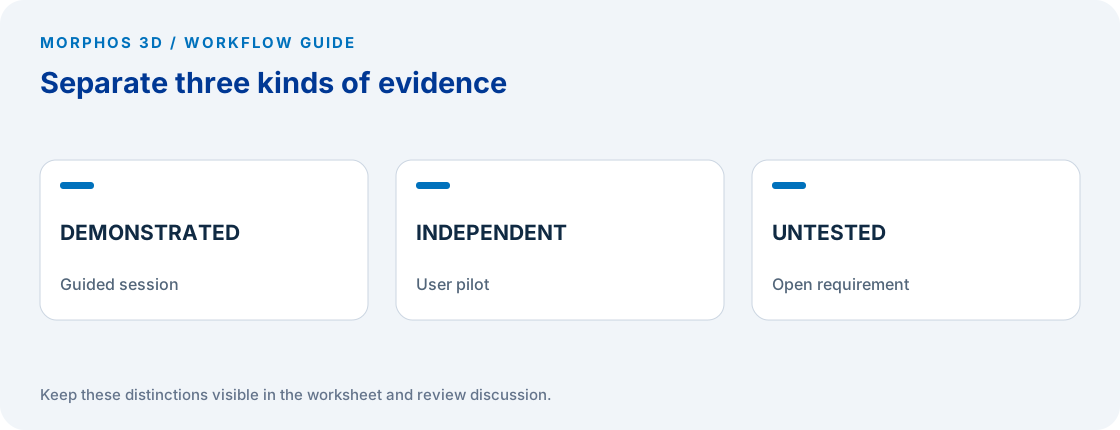
Close with a result, a limitation and the next test
Classify each acceptance row as demonstrated, failed, or not tested. Add the evidence reference and the person who accepted the result. “Looks good” is not an adequate record when the team later has to explain why a requirement was considered satisfied.
Choose one unresolved risk for a pilot. A pilot might ask a normal user to repeat the change, inspect a different customer data set, or verify the manufacturing export in the receiving environment. Keep the scope tied to the gap in the demonstration rather than repeating the same polished example.
A guided demonstration cannot establish migration completeness, production reliability or every required integration. Retain those limitations in the decision brief. If the test fails a mandatory condition, investigate the cause before spending time comparing preferences that cannot resolve the blocker.
Checks to carry into the discussion
| Test step | Acceptance condition to agree | Evidence |
|---|---|---|
| Open representative data | Required references and configuration are present | Input inventory and observed result |
| Make the agreed change | Intended geometry changes without unresolved dependencies | Before and after files |
| Update drawing | Required views and annotations describe the change | Checked drawing |
| Deliver package | Recipient can identify and use the intended output | Recipient response |
| Repeat independently | Normal user can complete the scoped task | Pilot observation |
Download the working worksheet
Send the test plan ahead of the discussion so the specialist can confirm what data and access are needed. Keep acceptance conditions short enough to inspect during the session. Afterward, attach the actual outputs rather than only presentation slides. Mark any work performed outside the observed session, and retain untested requirements as open rows. The next meeting should resolve those rows or define a pilot, rather than restart the evaluation from a feature list.
Fields: Test ID · Source file and revision · Requested change · Expected output · Acceptance condition · Environment · Assistance provided · Observed result · Evidence location · Accepted by · Next test.
The worksheet and decision method are original Morphos 3D guidance. Fill them with your own evidence; the file contains no customer data or assumed results.
Bring the source files, one required change and the acceptance conditions for the output.
A guided demonstration does not prove an independent pilot or migration.
Frequently asked questions
Should a demonstration use a difficult production assembly?
Use representative data and a known constraint, with permission to share it. An exceptional rescue case can obscure the normal workflow unless it is itself the reason for the evaluation.
Does a successful demonstration replace a pilot?
No. A guided session and an independent user test provide different evidence. Use the pilot to resolve the remaining operational or adoption risk.
Official references and method
References reviewed October 5, 2026. Product references support the specific capabilities discussed; the worksheets and decision steps are proposed guidance, not vendor benchmarks.
Discuss the next test
Bring the source files, one required change and the acceptance conditions for the output.