
Your CAD Software Decision Checklist
Use a CAD software decision checklist to separate proven requirements, unresolved blockers and implementation commitments. Proceed when mandatory conditions are supported, test a specific remaining uncertainty, or defer with a named trigger and review date.
CAD evaluators who have collected information but need to decide what happens next.
Defer is valid when no owner, budget or test evidence exists.
Use the CAD software decision checklist to close the question
A CAD evaluation can continue long after the useful questions have been answered. More feature material does not resolve an unassigned migration task or a manufacturing export that nobody has checked. The closing step is to write down what the team knows, what remains uncertain, and what decision that evidence supports.
Begin with the original reason for evaluating. Identify the affected workflow, the required improvement and the cost of leaving it unchanged, using observed evidence where available. If the original problem has disappeared or the priority has changed, record that explicitly instead of inventing urgency.
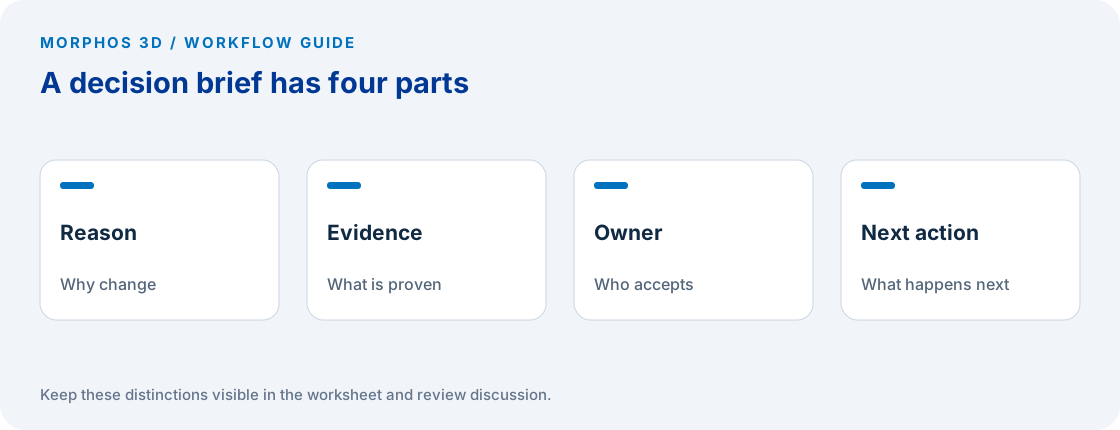
Keep the decision brief to one working page, with detailed evidence linked from it. The brief should be readable by the person approving the project without requiring them to reconstruct every demonstration, email and commercial discussion.
Separate acceptance evidence from preference
List each mandatory requirement with its acceptance result and evidence reference. A checked box should lead to a file, recipient confirmation, written IT response or other inspectable record. “Discussed with supplier” describes an activity, not a completed acceptance condition.
Then summarize preferences that influenced the shortlist. A preferred interface or a convenient review workflow can matter, but it should not obscure an unresolved mandatory integration. Keep those categories visible so the decision maker can see which tradeoffs are available and which conditions still block a commitment.
If the proposed workflow uses cloud data storage and revisions, the official Store & Revise module provides a starting point for the workflow discussion. Your decision still needs evidence for the intended access, operating responsibilities and exact offering. SOLIDWORKS Store & Revise learning module.
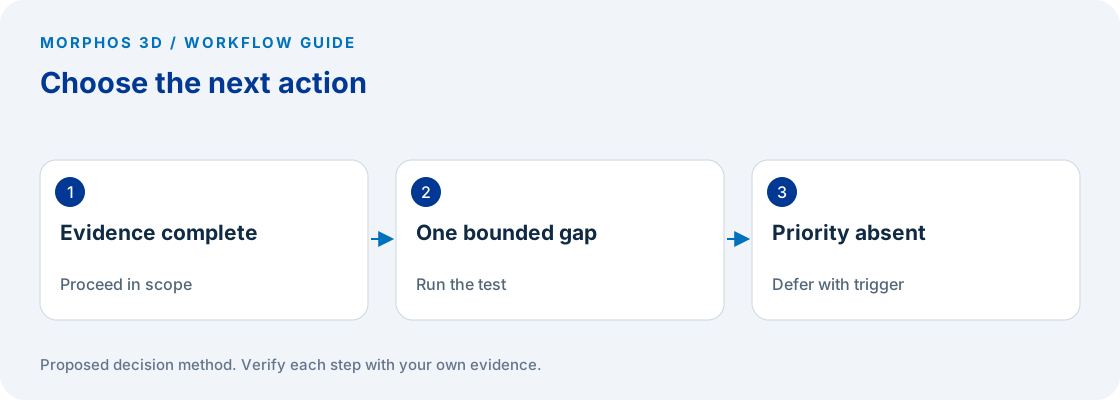
Choose proceed, test or defer
Proceed means the evidence supports the agreed scope and an accountable owner accepts the remaining implementation work. It does not mean every possible question about the product has been answered. State the scope so a decision about one team does not become an untested commitment for every location.
Test means one or more uncertainties remain that a bounded activity can resolve. Name the test, the acceptance condition, the owner and the expected decision afterward. “Schedule another demo” is incomplete unless the demonstration has a specific question to answer.
Defer means the project lacks a current business reason, an owner, resources, or evidence sufficient to justify the next commitment. Set a trigger such as a new product program, a staffing change, or a recurring file-handoff issue. A trigger is more useful than repeatedly sending the same material without knowing what would change the decision.
Put the method to work
Bring the completed decision checklist and the one unresolved question that could change the outcome.
Use the worksheet belowMake implementation commitments visible
List the templates, data, integrations, training and operating tasks that must be addressed for the approved scope. Assign an owner to each item and identify what has to happen before normal production work moves. Keep unconfirmed effort estimates labeled as estimates.
Separate the commercial decision from technical acceptance. Attach the dated proposal and have the authorized buyer confirm the exact products, terms and quantities. A technical worksheet should not be used as evidence that a license, service or support commitment is included.
Include a route back if the pilot exposes a mandatory failure. Identify which work stays in the current process until the acceptance conditions are met. That boundary makes it possible to test a new approach without treating a successful demonstration as permission to move every job.
Write the response that moves the project forward
If you are ready for a discussion, send the decision brief with the top unresolved requirement and the desired timeframe. That gives the technical reviewer something to prepare, rather than asking them to repeat a general product introduction.
If you need a test, state what result would change your decision. For example, ask the receiving manufacturing role to inspect a specific output from the representative job. Avoid adding unrelated feature questions that cannot affect the decision currently in front of the team.
If you defer, keep the evidence and record why. A future evaluation can start from the unresolved condition and refresh version-sensitive information instead of repeating the entire discovery process. The useful outcome is a clear next action or a clear reason to pause.
Checks to carry into the discussion
| Decision | Evidence required | Next action |
|---|---|---|
| Proceed within scope | Mandatory conditions supported; implementation owner accepts work | Confirm commercial and rollout commitments |
| Run a bounded test | Specific uncertainty with an acceptance condition | Assign test owner and decision date |
| Defer | No current priority, owner or justified commitment | Record trigger and review point |
| Reject this candidate | Mandatory requirement failed with inspected evidence | Retain reason and consider alternatives |
Download the working worksheet
Complete the decision field only after reviewing the evidence rows with the affected owners. Keep a short record of any disagreement, including what observation would resolve it. Use the review date as a reminder to reassess the stated trigger, not as an automatic buying deadline. Before reusing an older brief, refresh product-version details, access assumptions and commercial information. Preserve the earlier decision so the team can see what changed.
Fields: Decision scope · Business reason · Mandatory requirement · Evidence reference · Open blocker · Decision proceed/test/defer/reject · Implementation owner · Commercial confirmation owner · Next action · Review trigger · Review date.
The worksheet and decision method are original Morphos 3D guidance. Fill them with your own evidence; the file contains no customer data or assumed results.
Bring the completed decision checklist and the one unresolved question that could change the outcome.
Defer is valid when no owner, budget or test evidence exists.
Frequently asked questions
Is deferring a CAD evaluation a failed outcome?
No. Deferral is a useful decision when the reason, trigger and owner are recorded. It prevents an indefinite evaluation from consuming attention without a current business need.
What should be sent before a technical discussion?
Send the affected workflow, representative data where permitted, the strongest unresolved requirement and the evidence already collected.
Official references and method
References reviewed October 5, 2026. Product references support the specific capabilities discussed; the worksheets and decision steps are proposed guidance, not vendor benchmarks.
Discuss the next test
Bring the completed decision checklist and the one unresolved question that could change the outcome.