
CAD Evaluation Scorecard for Small Engineering Teams
Start a CAD evaluation scorecard with mandatory requirements, then weight the remaining workflow needs. Score only observed results, keep untested items visible, and compare the same representative work in each candidate system.
Small engineering teams choosing or replacing a CAD authoring system.
A weighted total cannot compensate for a failed mandatory requirement.
Start the CAD evaluation scorecard with the work
A CAD shortlist becomes difficult to defend when one person remembers the assembly demonstration and another remembers the drawing tools. Before comparing products, agree on the work that has to leave engineering: a changed part, an assembly that still fits, a drawing that communicates the change, and a usable package for the next person.
Choose a typical job and one troublesome variation. A single machined component will not represent a team that spends most of its time maintaining configurable equipment assemblies. Conversely, an elaborate assembly demonstration can distract a small team whose recurring problem is producing readable drawings from customer-supplied geometry.
Write the business reason beside each requirement. “Import customer geometry” is incomplete until you identify the file source, the intended modification, and the downstream deliverable. This turns a feature request into a test that an engineer can actually accept or reject.
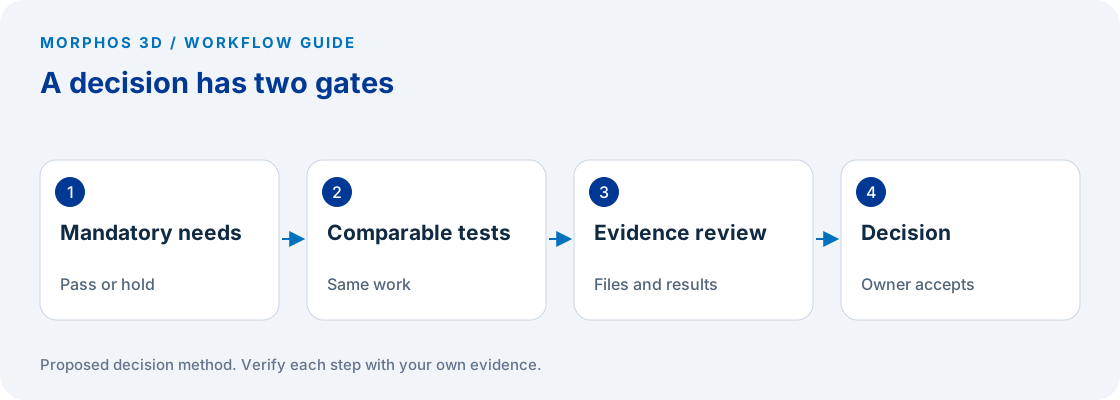
Separate mandatory gates from preferences
Put requirements that would stop the project in a separate gate column. These may include an approved operating environment, a customer-required exchange process, an essential integration, or a security condition determined by your own IT team. Record who has authority to accept the evidence for each gate.
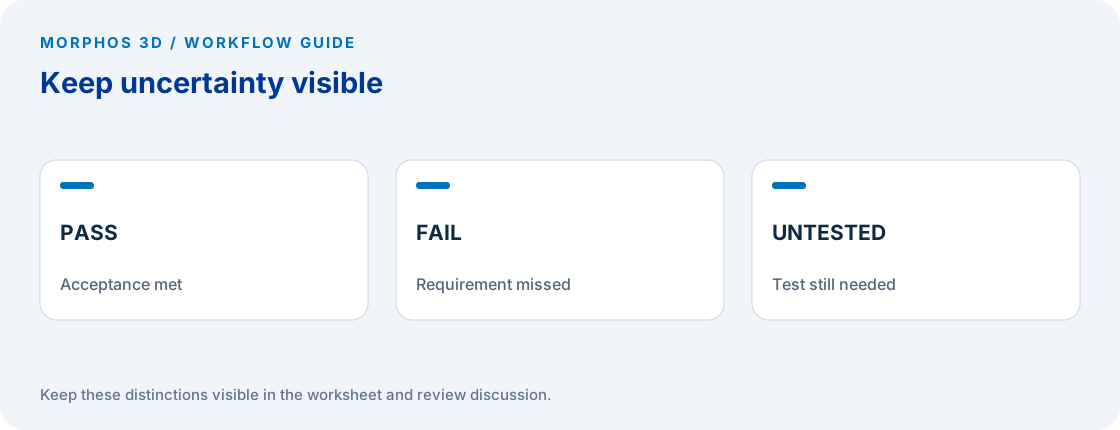
Do not assign a large weight to a mandatory requirement and hope the arithmetic will handle it. A candidate can accumulate enough points elsewhere to hide the failure. Gate status should remain pass, fail, or untested, with a failed or untested mandatory gate preventing an unconditional recommendation.
Keep preferences in the scored portion. Drawing setup effort, repeated editing work, review access, and the effort needed to maintain templates can matter without being absolute exclusions. If everything is mandatory, ask which conditions are genuinely contractual or operational and which are preferences that can be traded against implementation effort.
Weight decisions before watching demonstrations
Distribute 100 weighting points among the scored requirements before collecting candidate results. The number is a convenient planning convention, not an industry standard. Ask the engineer, manufacturing recipient, and system owner to explain their priorities before agreeing on one set of weights.
Use an explicit scale: 0 means the test failed; 1 means the task was completed with an unacceptable workaround; 2 means it met the agreed acceptance condition; 3 means it exceeded that condition in an observable way. Leave untested cells blank. Do not give them zero or silently remove them from the denominator.
For fully tested requirements, calculate the weighted result as the sum of each weight multiplied by its score divided by three. Report tested weight separately from the result. Comparing a fully tested candidate against one with large gaps produces false precision, even when the spreadsheet displays two decimal places.
Put the method to work
Bring one representative job and the three requirements that could stop your CAD decision.
Use the worksheet belowCollect evidence the next person can inspect
Attach a file, screenshot, recording timestamp, or written test result to every score. Record the software release, hardware, data set, operator, assistance provided, and any preparation performed before the demonstration. A result dependent on an expert rebuilding your source geometry deserves a note about that effort.
Treat collaboration as a recipient task. Ask someone outside the authoring role to open the proposed review package and record a specific comment. SOLIDWORKS documents browser-based review in its Share & Markup learning module; the actual recipient access and settings still need to be tested for your chosen offering. SOLIDWORKS Share & Markup learning module.
Capture the downstream check too. If manufacturing needs a drawing and a model, the test is incomplete when only the model opens successfully. Ask the recipient to identify the approved revision and the changed feature without relying on the demonstrator to explain which file is current.
Account for the work of changing systems
Keep implementation questions beside the scorecard rather than blending them into vague “ease of use” ratings. List templates to rebuild, data to migrate, staff to train, integrations to test, and the person who will own each item. Request commercial terms separately and date the quote; this worksheet does not establish pricing or licensing entitlement.
Include your current system as a candidate. A template correction or a better release process may address the problem without a platform change. Test that alternative with the same task and evidence standard so that keeping the present system becomes a reasoned decision rather than the default.
Finish with the top unresolved requirement, not just the highest score. If the preferred candidate has an untested manufacturing handoff, the next action is a recipient test. If every gate passes and the implementation owner accepts the remaining work, the scorecard can support a decision discussion.
Checks to carry into the discussion
| Requirement | Evidence to collect | Acceptance owner |
|---|---|---|
| Customer data edit | Representative incoming file plus required design change | Design lead |
| Drawing output | Checked dimensions, annotations and revision identification | Drawing approver |
| Assembly change | Updated component and inspected dependent relationships | Assembly owner |
| Manufacturing handoff | Recipient opens and identifies the approved package | Manufacturing lead |
| Review access | Intended reviewer opens and comments using intended access | Review owner |
| Rollout constraint | Written IT or commercial confirmation for the exact setup | Accountable owner |
Download the working worksheet
Create one row per requirement and candidate. Copy the same requirements across candidates, then record results without changing the acceptance wording after seeing a demonstration. If a requirement changes, retain the old wording and re-evaluate every affected candidate. Keep the mandatory gates visible on a separate filtered view. The score is a summary of the evidence, while the evidence remains the basis for the decision.
Fields: Requirement · Why it matters · Mandatory yes/no · Weight · Candidate · Score 0-3 or blank · Evidence reference · Release and environment · Acceptance owner · Open question.
The worksheet and decision method are original Morphos 3D guidance. Fill them with your own evidence; the file contains no customer data or assumed results.
Bring one representative job and the three requirements that could stop your CAD decision.
A weighted total cannot compensate for a failed mandatory requirement.
Frequently asked questions
Should every feature receive a weight?
No. Weight the work that matters to the intended workflow. Keep mandatory requirements as separate gates and leave irrelevant features outside the scorecard.
Can an untested requirement receive a zero?
Keep it marked untested. A zero denotes an observed failure in this proposed scoring method, while an untested item is a gap in the evidence.
Official references and method
References reviewed October 5, 2026. Product references support the specific capabilities discussed; the worksheets and decision steps are proposed guidance, not vendor benchmarks.
Discuss the next test
Bring one representative job and the three requirements that could stop your CAD decision.