
If you run a CNC shop and you are shopping for CAM, three names come up fast: SOLIDWORKS CAM, CAMWorks, and Mastercam. The first two get pitted against each other constantly, which is backwards, because they are the same machining engine sold at two levels rather than two rival products. Mastercam is the genuine alternative here, a standalone system built on a different philosophy that has been on more shop floors, for longer, than almost anything else in the category. I have sat in a buying conversation where a shop was about to pay again for a 3-axis capability it already owned inside its SOLIDWORKS seats, simply because nobody had untangled the family tree first. So untangle it: get the relationship straight, then weigh a fair, specifics-first comparison against the parts you actually cut and the machines you actually run.
The short answer
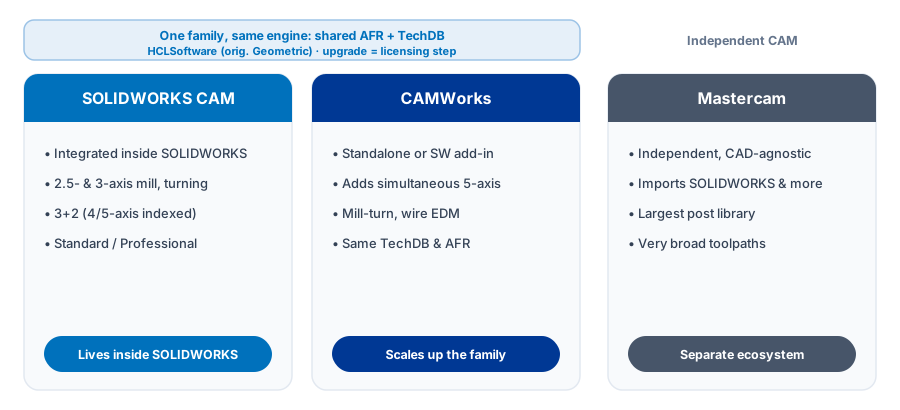
SOLIDWORKS CAM and CAMWorks are one engine at two levels. SOLIDWORKS CAM is the integrated subset inside SOLIDWORKS: 2.5- and 3-axis milling, turning, and 3+2 indexed (positional) machining. CAMWorks is the fuller product, adding simultaneous 5-axis, mill-turn, and wire EDM. Mastercam is an independent, CAD-agnostic standalone with the broadest toolpaths and one of the largest post libraries in the industry. Pick the SOLIDWORKS CAM and CAMWorks family to stay in SOLIDWORKS with knowledge-based automation. Pick Mastercam for maximum breadth independent of any single CAD system.
First, clear up the confusion: SOLIDWORKS CAM is CAMWorks
SOLIDWORKS CAM and CAMWorks run on the same core engine, originally built by Geometric and now owned and developed by HCLSoftware. The practical way to think about it: SOLIDWORKS CAM is a slice of CAMWorks bundled with SOLIDWORKS, while CAMWorks is the full, scalable platform. Anything you program in SOLIDWORKS CAM uses the same Automatic Feature Recognition (AFR) and the same Technology Database (TechDB) you would use in CAMWorks, so the skills and the data carry straight across.
SOLIDWORKS CAM ships in two levels, Standard and Professional. Standard covers 2.5-axis milling, contouring, facing, pocketing, drilling, and tapping. Professional adds turning, 3-axis milling, high speed VoluMill toolpaths, 3+2 indexed (positional) machining, and assembly machining. It stops short of simultaneous 5-axis, which is a CAMWorks capability, not a SOLIDWORKS CAM one. For the full breakdown, see the guide to SOLIDWORKS CAM Standard vs Professional.
CAMWorks is where the family scales up. It adds undercut handling, simultaneous 4- and 5-axis milling, full mill-turn and multi-axis lathe, wire EDM, and rotary machining. The line between positional 3+2 work and true simultaneous motion trips up a lot of buyers, and it is worth getting straight before you sign for either tier, so it gets its own walk-through in SOLIDWORKS CAM 5-axis vs 3+2 machining. Because the TechDB and feature recognition are shared, a shop can start in SOLIDWORKS CAM and step up to CAMWorks later without discarding its programming knowledge. The move is mostly a licensing step, and your TechDB comes with you.
What makes this family different: feature recognition and the TechDB
The signature of the SOLIDWORKS CAM and CAMWorks family is knowledge-based machining. Two features drive it:
- Automatic Feature Recognition. The software scans a solid model and identifies machinable features such as pockets, holes, slots, and bosses, rather than making you select geometry by hand for every operation.
- TechDB. The Technology Database stores your shop's preferred tools, speeds, feeds, and operation strategies. Once a feature is recognized, the TechDB can apply your standard methods automatically, so two programmers tend to produce consistent code.
The payoff is speed and repeatability on prismatic, feature-rich parts, and the fact that it all happens inside SOLIDWORKS. When the design model changes, the CAM associativity means your toolpaths update instead of being reprogrammed from scratch. For shops that already own SOLIDWORKS, that single-window workflow removes file translation and the version mismatches that come with moving models between systems.
Not sure whether the CAM seat you already own covers your part mix, or whether your jobs genuinely demand a step up to CAMWorks or a standalone? The honest answer lives in your part prints and your machine list, not a spec sheet.
Get a QuoteWhat Mastercam brings to the table
Mastercam, developed by CNC Software, a Sandvik company, is one of the most widely used standalone CAM systems in the world. It is CAD-agnostic, so it imports models from SOLIDWORKS, Inventor, Creo, and neutral formats, and programs them in its own environment. Its reputation rests on two things in particular:
- Toolpath breadth. Mastercam offers a deep catalog of milling, turning, mill-turn, Swiss, router, and wire toolpaths, including a rich set of multi-axis strategies such as swarf, multiblade, and flowline machining. Shops with unusual or highly varied work value having that many specialized options on tap.
- Post processor library. Mastercam maintains one of the largest post libraries anywhere, with thousands of ready-to-run posts spanning most machine brands and control types, plus a strong network for custom post development. For a shop running many different machines, mature posts shorten the path to reliable G-code.
A very large installed base backs all of this, which means a deep pool of trained programmers, training centers, and community knowledge. That ecosystem is a practical advantage when you are hiring or troubleshooting a stubborn post.
To be fair to the other side: the SOLIDWORKS CAM and CAMWorks family also produces G-code through posts, covered in this breakdown of SOLIDWORKS CAM post processors. The gap is one of scale and history, not capability on any single machine. A well-built post for your specific Haas or Fanuc control produces edit-free code whichever family wrote it.
Side-by-side comparison
| Capability | SOLIDWORKS CAM | CAMWorks | Mastercam |
|---|---|---|---|
| Relationship | Integrated subset of CAMWorks | Full standalone or add-in engine | Independent standalone CAM |
| Developed by | HCLSoftware (bundled by Dassault) | HCLSoftware | CNC Software (a Sandvik company) |
| CAD integration | Native, inside SOLIDWORKS | Inside SOLIDWORKS, or standalone | CAD-agnostic, imports models |
| Feature recognition | Automatic Feature Recognition | Automatic Feature Recognition | Available, less central to workflow |
| Knowledge base | TechDB | TechDB | Tool and operation libraries |
| Milling range | 2.5- & 3-axis, 3+2 indexed in Pro | Up to simultaneous 5-axis | 2.5- through simultaneous 5-axis |
| Multi-axis motion | 3+2 indexed (positional) only | Simultaneous 4- & 5-axis | Simultaneous 5-axis, swarf, multiblade |
| Turning and mill-turn | Turning in Pro | Full mill-turn and multi-axis lathe | Full lathe, mill-turn, Swiss |
| Wire EDM | Not included | Yes | Yes |
| Post library | Shared with CAMWorks | Broad, custom posts available | One of the largest in the industry |
| Cost / licensing | Standard included with SW subscription (2018+) | Paid step up, TechDB carries over | Separate standalone purchase |
| Best fit | SOLIDWORKS shops, prismatic parts | SOLIDWORKS shops needing multi-axis | Mixed CAD, broad machine mix |
When each one makes sense for a shop
There is no universally correct answer, only the right fit for your work. Here is how it generally breaks down.
Choose SOLIDWORKS CAM when
- You already design in SOLIDWORKS and want CAM in the same window.
- Your work is mostly 2.5-axis mill and straightforward turning.
- You want feature recognition and a TechDB to standardize programming and cut setup time.
- You value design-to-toolpath associativity when models change.
Choose CAMWorks when
- You like the SOLIDWORKS-integrated, knowledge-based approach but need more.
- Your jobs include simultaneous 5-axis, mill-turn, multi-axis lathe, rotary, or wire EDM.
- You want a clean upgrade path that preserves your TechDB and feature recognition work.
Choose Mastercam when
- You take models from many CAD systems and want CAM that is not tied to one.
- You need the widest possible range of specialized toolpaths and the deepest post library.
- You run a large, varied machine fleet and want mature, proven posts for each control.
- You hire from a large pool of programmers already trained on the platform.
One honest note: some shops run both. They design and program prismatic, high-volume work inside SOLIDWORKS CAM for speed and associativity, and lean on a standalone system for one-off or exotic multi-axis jobs. CAM choices are not always either-or.
Cost and licensing, the honest version
SOLIDWORKS CAM Standard carries no separate license fee. It has shipped with every seat of SOLIDWORKS on active subscription since the 2018 release, so most SOLIDWORKS shops already own a working CAM seat whether they use it or not. Professional and the step up to CAMWorks are paid add-ons, but the TechDB and feature recognition you build at the Standard level carry forward, so nothing you set up gets thrown away. Mastercam is a separate purchase with its own license and maintenance, independent of your CAD. Prices are not listed here because they hinge on configuration, seat count, and whatever promotion is running that quarter, so any single number would be wrong by the time you read it. The honest move is to price a quote against your actual modules rather than trust a figure someone posted on a forum two years ago.
Scoping the choice against your own floor
The decision that actually matters is not which product wins a feature chart, it is which seat covers the parts running through your shop without paying for motion you never cut. That comes down to your real part mix, your controls, your TechDB, and your post processor needs, lined up against what SOLIDWORKS CAM already includes versus where CAMWorks earns its step up. The SOLIDWORKS CAM and NC Shop Floor Programmer pages are a good place to start, and Morphos 3D is an authorized SOLIDWORKS reseller if you want that scoping run against your actual jobs.
The bottom line
Do not treat SOLIDWORKS CAM and CAMWorks as rivals. They are one technology at two levels, both built on feature recognition and the TechDB, both living comfortably inside SOLIDWORKS. The real decision is between that integrated, knowledge-based family and Mastercam's broad, CAD-agnostic, post-rich approach. Map the choice to your CAD environment, your machines, and the kind of parts you cut, and the right answer usually becomes clear. When it does not, the tie-breaker is almost always the part mix you run most weeks, so weigh that harder than any single headline feature.