
If your SOLIDWORKS seat is on subscription, you already have SOLIDWORKS CAM Standard, whether you have turned it on or not. So for most shops the real question is not whether to buy CAM, it is SOLIDWORKS CAM Standard vs Professional: is the included edition enough, or does the work you run justify stepping up? Pay for Professional you do not use and you have wasted money. Stay on Standard when you need a lathe and you are stuck. Here is how to tell the difference.
What SOLIDWORKS CAM is
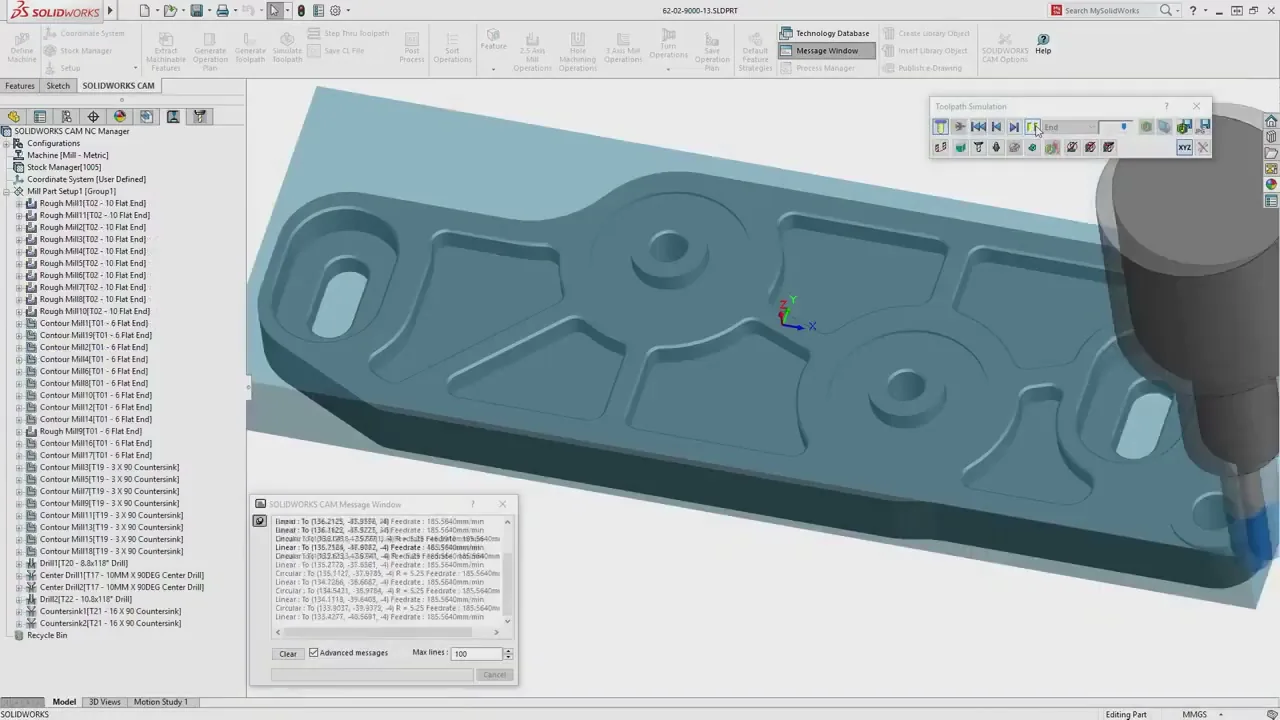
SOLIDWORKS CAM is a computer-aided manufacturing tool built directly into SOLIDWORKS, powered by the CAMWorks engine. It uses Automatic Feature Recognition to find machinable features and a Technology Database to apply your proven strategies, and because the toolpaths are tied to the model, a design change updates the program instead of scrapping it. The Standard edition is included with an active SOLIDWORKS subscription.
Is SOLIDWORKS CAM free?
Standard is, in effect. SOLIDWORKS CAM Standard is included at no additional license cost for any seat on an active subscription running 2018 or newer, and you activate it right inside SOLIDWORKS. Professional is the paid step up. If you want the full picture on what subscription includes and what add-ons cost, see how much SOLIDWORKS costs.
Standard vs Professional: the difference
| Capability | Standard | Professional |
|---|---|---|
| 2.5-axis milling | Yes | Yes |
| Automatic Feature Recognition | Yes | Yes |
| Toolpath simulation and NC editor | Yes | Yes |
| Technology Database (rules and tolerance-based) | Yes | Yes |
| High-speed machining (VoluMill) | No | Yes |
| Turning (lathe) | No | Yes |
| 3+2 programming for 4- and 5-axis | No | Yes |
| Assembly machining with fixture awareness | No | Yes |
In short, Standard automates 2.5-axis milling on single parts. Professional is what you reach for when the work involves lathes, high-speed roughing, multi-axis positioning, or machining a part inside its fixture.
Which one does your shop need?
Standard is enough if you mill prismatic parts from native SOLIDWORKS files, you want to cut down manual toolpath setup, and you are new to integrated CAM. It is a genuine starting point at no extra license cost.
Professional is the move if you run turning operations, want VoluMill high-speed machining to pull cycle time and extend tool life, machine assemblies with fixture awareness, or need 3+2 to pre-position a 4- or 5-axis machine. In practice, most shops that evaluate CAM seriously find they need Professional within the first year, usually the first time a job involves a lathe or a part that is not flat-and-prismatic.
One licensing note: SOLIDWORKS CAM Professional is available on a Device Term License (machine-locked, three-month or one-year) or a Single-User Subscription tied to a person and usable on any device. We can help you pick the model that fits how your shop is set up.
Not sure whether your work has outgrown Standard? Walk through it with a CAM programmer.
Get a QuoteIt works on imported files too
This matters for job shops that machine customer parts. Automatic Feature Recognition analyzes geometry, not SOLIDWORKS feature history, so you can program an imported STEP or IGES solid the same way you would a native part. If you are bringing files in from another system, our Fusion to SOLIDWORKS migration guide covers what comes across and what does not.
Beyond Professional: Machinist editions and CAMWorks
Two more options sit above the basics. The Machinist editions add a part and assembly modeling environment for shops that work with imported files but do not run a full SOLIDWORKS CAD license. And because SOLIDWORKS CAM is powered by CAMWorks, you can step up later to capabilities like simultaneous 5-axis milling, mill-turn, or wire EDM, and your TechDB knowledge transfers directly. You are not boxed in by where you start.
The part that matters more than the edition
Standard or Professional, a toolpath only counts if it posts clean. A post-processor translates the program into the exact G-code your control expects, and a generic post that almost works is worse than none. Getting tested posts for your Haas, Fanuc, Mazak, or Siemens is the difference between a CAM seat that pays off and one that scraps material. To edit and verify code at the machine, pair CAM with NC Shop Floor Programmer.
How Morphos helps
We will check whether your subscription already includes Standard, right-size Standard against Professional for the work you actually run, source and test post-processors for your controls, and help set up your TechDB so it gets smarter with every job. CAM only earns its keep when it produces good parts on your machines, and that is the part we know.