3DEXPERIENCE Platform

3DEXPERIENCE Platform

Dassault Systèmes' cloud platform — design, simulate, collaborate, and manage data from one login.

SOLIDWORKS® and the 3DEXPERIENCE Platform

The 3DEXPERIENCE Platform is Dassault Systèmes' cloud-based innovation environment that connects design, simulation, collaboration, and data management under a single login. It hosts cloud-native design tools like xDesign and xShape, and connects directly to SOLIDWORKS desktop through the 3DEXPERIENCE SOLIDWORKS connector — so your engineers keep using the tool they know while gaining access to cloud storage, collaborative review, and PLM capabilities on the same platform.

  • Hosts cloud-native SOLIDWORKS tools including xDesign, xShape, 3DDrive, ENOVIA, and 3DSwym
  • Browser-based: access from any device, no local install required for cloud-native apps
  • Connects to desktop SOLIDWORKS via the 3DEXPERIENCE SOLIDWORKS connector
SOLIDWORKS Authorized Reseller Morphos 3D is an authorized SOLIDWORKS reseller with deep manufacturing expertise.
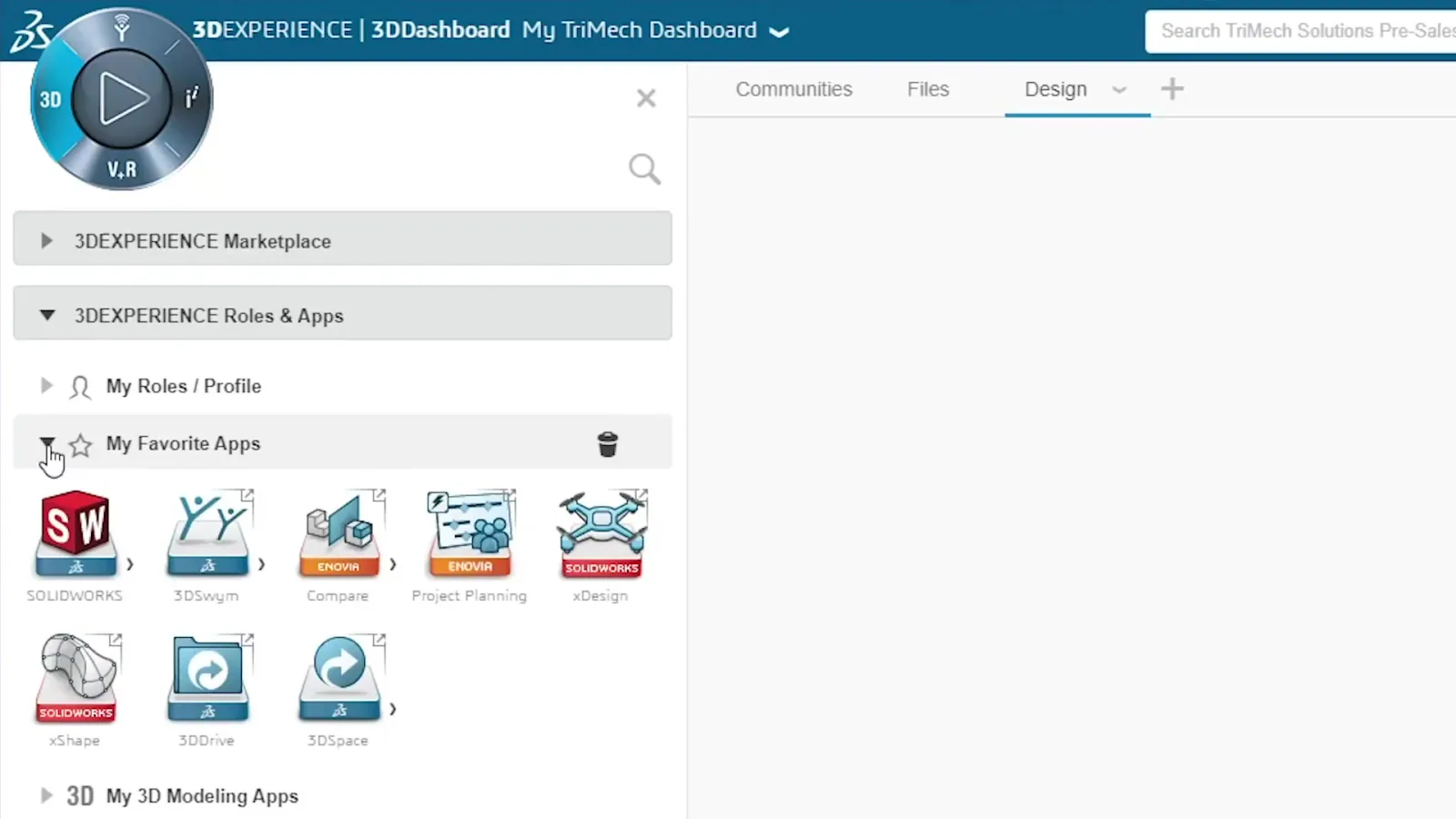
3DCompass launcher with SOLIDWORKS, xDesign, and 3DDrive
Desktop and cloud together: The 3DEXPERIENCE Platform is not an either/or decision. Your engineers keep their SOLIDWORKS desktop for parametric modeling. The platform adds cloud file access, collaborative review, ENOVIA data management, and cloud-native design capabilities on top of that foundation. Both environments share the same data source.

Key Apps on the 3DEXPERIENCE Platform

Each application addresses a specific part of your product development workflow. Your team gets access to the apps that match their role — not a blanket install of everything.

3DDrive
3DSwym
ENOVIA
3DSearch
xDesign
xShape
3DDashboard
Collaborative Tasks
Platform roles are licensed per user on an annual subscription. Which apps your team accesses depends on which roles are assigned. Morphos maps your team's workflow to the right roles before any purchase is made — so you pay for what you actually need, not a bundle of unused features. Contact us to discuss role configuration for your team.

The Platform in Practice

Cloud Storage
3DDrive: Your CAD Data in the Cloud

Cloud storage built for SOLIDWORKS. Save directly from the desktop connector, manage revisions, and access files from any device.

  • Save SOLIDWORKS files directly to the cloud from the desktop connector
  • Collaborative spaces organize data by project, product line, or team
  • Revision management with lock/unlock to prevent overwrites during active work
  • Access files from browser on any device — no VPN or shared drive required
  • Share specific files or spaces with external reviewers without exposing your entire vault
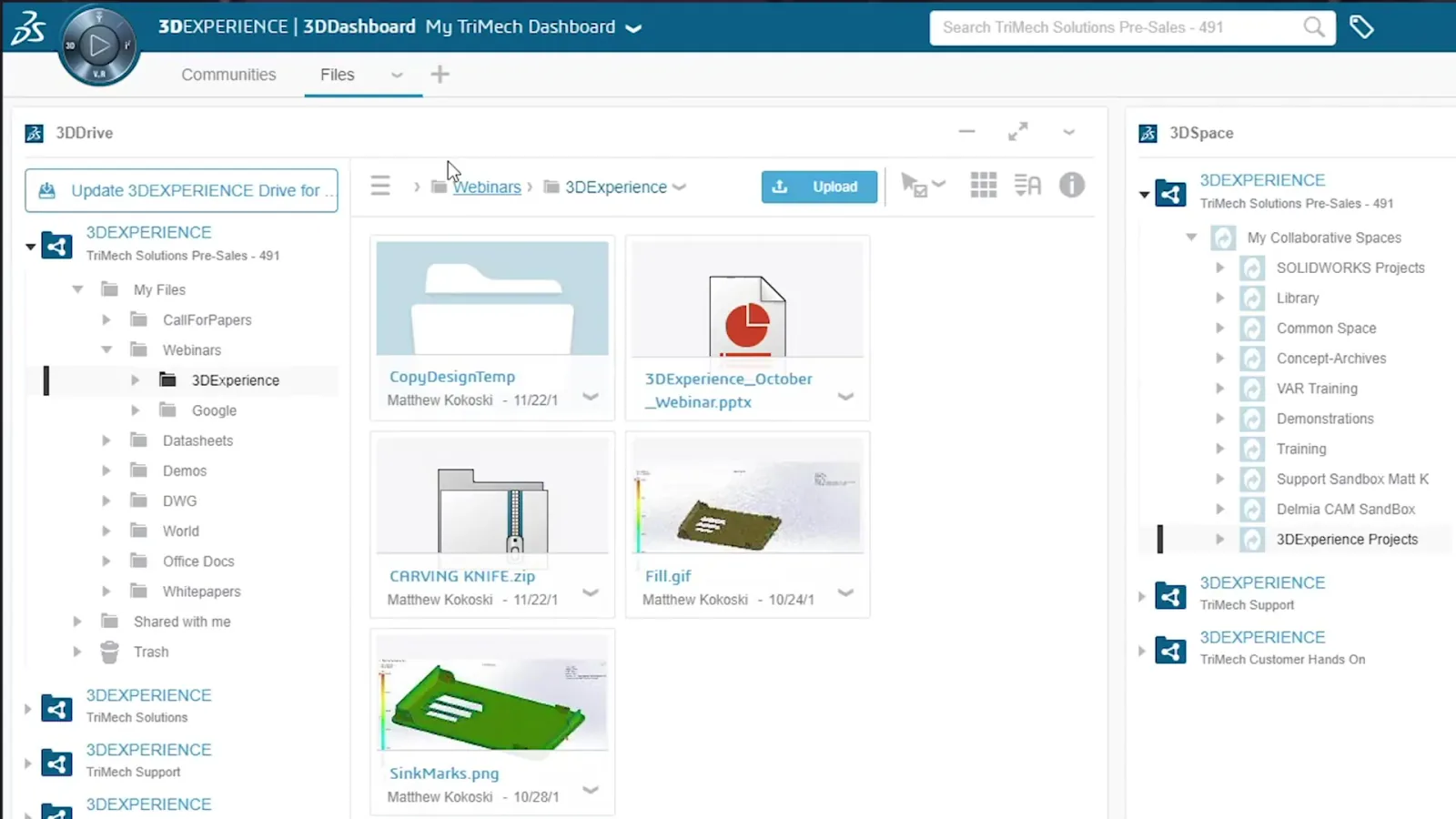
3DDrive cloud file browser showing collaborative spaces and folders
Replacing the shared drive: Many manufacturing teams store SOLIDWORKS data on a mapped network drive. That works until someone works remotely, a file gets overwritten, or the server goes down. 3DDrive solves all three — with version control built in and no server to maintain.
Connected Applications
3DCompass: One Launcher for Every Tool

One login launches every platform tool — SOLIDWORKS desktop, xDesign, 3DDrive, ENOVIA, and 3DSwym — with no separate credentials per application.

  • Single sign-on across all platform applications
  • Role-based launcher: each user sees only the apps their role provides
  • Connects desktop SOLIDWORKS to cloud apps via the SOLIDWORKS connector
  • Access xDesign, xShape, and other cloud-native tools from the same login
  • Accessible from browser on Windows, Mac, and tablet
3DCompass launcher with SOLIDWORKS, xDesign, and 3DDrive
One login, one data source: When your engineers open a model from 3DDrive in SOLIDWORKS desktop, and a reviewer opens the same model in the browser viewer, they are looking at the same file. There is no sync, no export, no version mismatch. The platform is the single source of truth that both access points share.
Task Management
ENOVIA Collaborative Tasks: Engineering Work Tracked

Kanban-style task management linked directly to platform models, drawings, and BOMs — with formal approval workflows and full audit trail.

  • Kanban board with customizable stages for your design process
  • Tasks linked directly to models, drawings, and documents in the platform
  • Assign tasks to team members, set due dates, and track status
  • Formal approval workflows for design releases and change actions
  • Full audit trail for change history and decision records
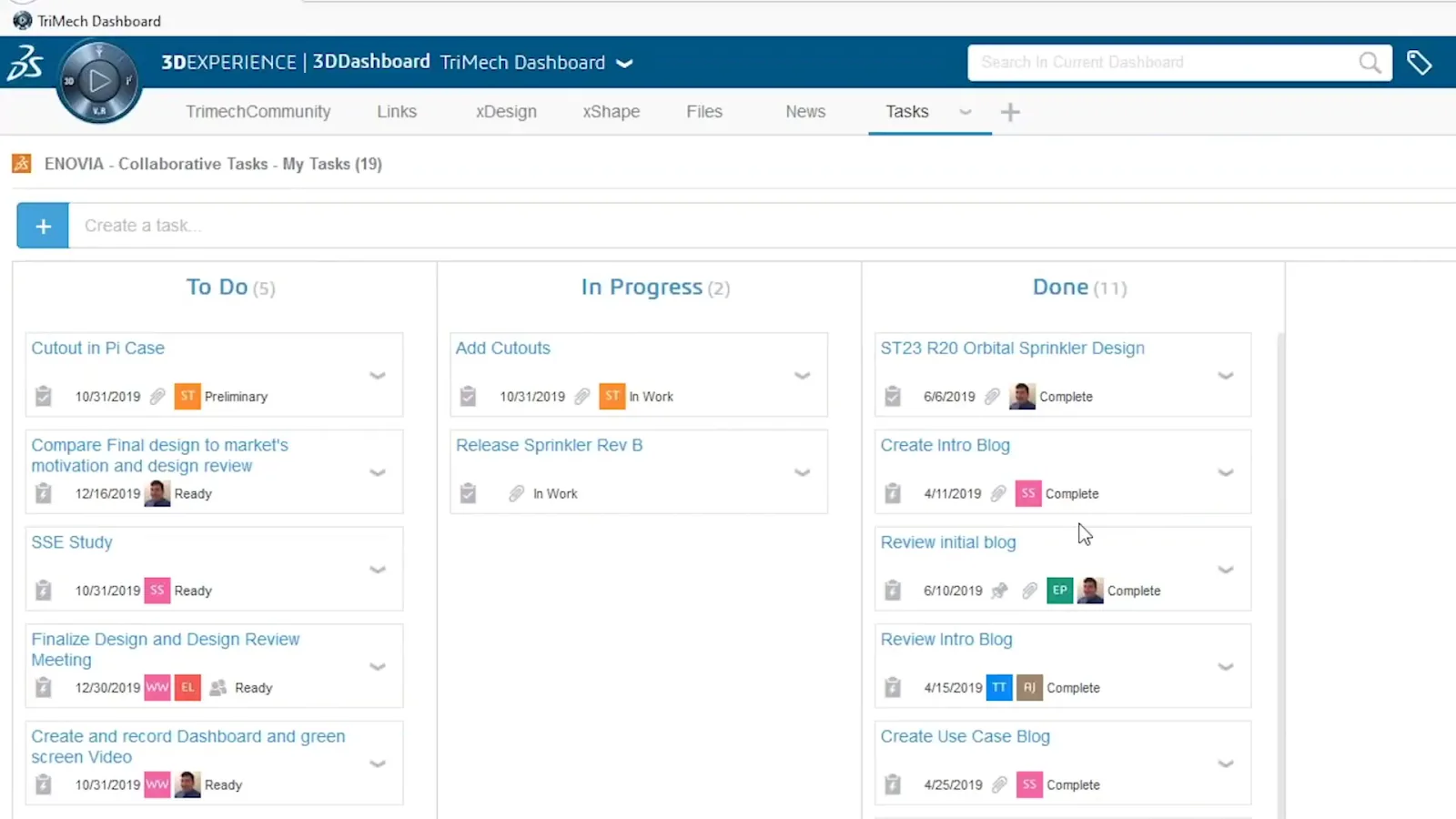
ENOVIA Collaborative Tasks kanban board with engineering tasks
For project visibility: When a program manager asks "where is this part in the design process," the answer should not require interrupting an engineer. ENOVIA Collaborative Tasks gives non-technical stakeholders a live view of design progress without touching the CAD environment.
Personalized Workspace
3DDashboard: Your Data, Your Way

Customizable multi-panel workspace combining file browser, 3D viewer, BOM panel, and community feed. Morphos configures role-specific templates so each user starts with the right view.

  • Multi-panel layout: combine file browser, 3D viewer, BOM, and community feed
  • Role-specific dashboard templates shared across the team
  • Real-time 3D model navigation in the browser panel without a separate viewer
  • Links directly to ENOVIA tasks, 3DDrive files, and 3DSwym discussions
  • Accessible from browser — no additional software beyond the platform login
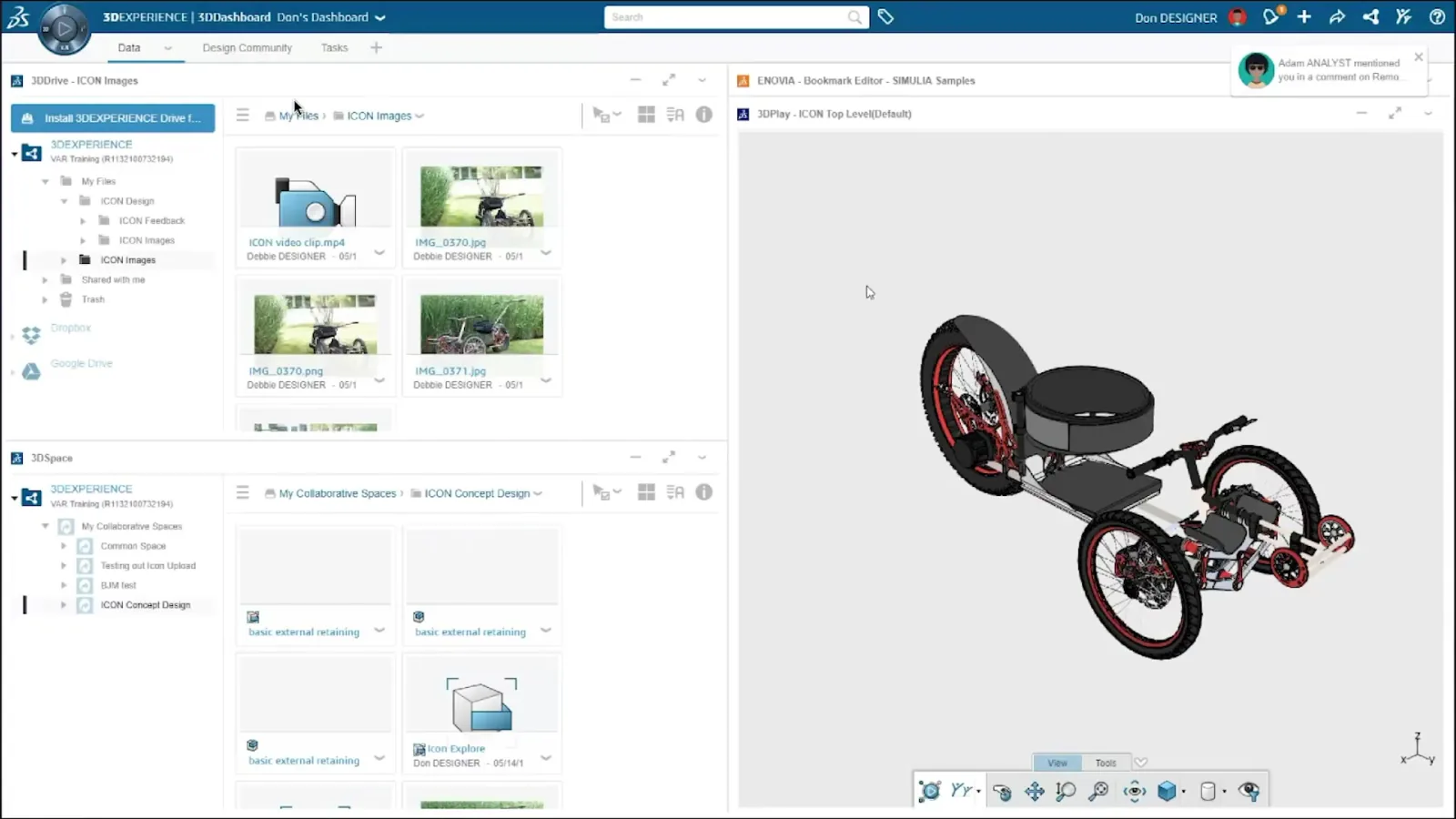
Multi-panel 3DDashboard combining file browser, space, and 3D viewer
Morphos sets up your dashboards: An out-of-the-box 3DDashboard is powerful but generic. We configure role-specific dashboard templates for your engineering, manufacturing, purchasing, and management users — so each team member opens a workspace that shows exactly what they need, without hunting through menus to find it.

How Morphos 3D Configures the Platform for Your Team

We start with your current workflow — how your SOLIDWORKS data is organized, who needs access to what, and where your pain points are. From that we derive which roles each team member needs, how your collaborative spaces should be structured, and what dashboard configurations suit each role. Once deployed, we connect desktop SOLIDWORKS to the platform, migrate existing data, and run onboarding sessions per role group so every user — engineer, manufacturing, purchasing, management — walks away knowing exactly how to work in the platform.

Common Questions About the 3DEXPERIENCE Platform

No. The 3DEXPERIENCE Platform is a complement to SOLIDWORKS desktop, not a replacement. Your engineers continue using SOLIDWORKS exactly as they do today. The 3DEXPERIENCE SOLIDWORKS connector lets desktop SOLIDWORKS save files to and open files from the cloud platform, so both environments share the same data source. You can adopt the platform incrementally — starting with cloud storage, then adding collaboration, then PLM capabilities — without disrupting the design workflow your team already runs.
The 3DEXPERIENCE Platform is licensed on a per-user, per-role, annual subscription basis. The cost depends entirely on which roles each user needs — a full engineering role with ENOVIA PLM is priced differently from a lightweight reviewer role that only needs 3DDrive and 3DSwym access. There is no single-price bundle to describe because the right configuration varies significantly by team size and workflow. Contact Morphos and we will map your team's needs to specific roles and provide a detailed quote based on your actual requirements.
For desktop SOLIDWORKS users connecting to the platform, you need a current SOLIDWORKS license with an active subscription and the 3DEXPERIENCE SOLIDWORKS connector installed — which Morphos handles as part of implementation. For cloud-native apps (xDesign, xShape, browser-based viewers), the only requirement is a modern browser and internet access. There is no on-premises server to deploy or maintain; the platform is fully cloud-hosted by Dassault Systèmes.

More Questions

They are different products that can coexist or serve as alternatives depending on your situation. SOLIDWORKS PDM is an on-premises vault focused on file-level version control and access management for engineering data. The 3DEXPERIENCE Platform provides cloud-based file storage (3DDrive), collaboration tools, and PLM-grade data governance (ENOVIA) in a single environment. For teams without PDM, the platform can serve as a cloud-native alternative. For teams already on PDM, the platform adds collaboration and PLM capabilities without replacing the vault. We can help you think through the right combination for your infrastructure.
Both are parametric CAD tools in the SOLIDWORKS portfolio, but they serve different use cases. SOLIDWORKS desktop is a fully mature, feature-complete parametric modeler that runs locally on your workstation and is the standard for production engineering in manufacturing. xDesign is a cloud-native, browser-based parametric modeler that runs entirely on the 3DEXPERIENCE Platform — no local install, accessible from any device, and built for real-time multi-user collaboration. For most manufacturing teams, SOLIDWORKS desktop remains the primary design tool; xDesign is used for concept work, remote access scenarios, or teams that want to pilot cloud-native design without replacing their existing desktop environment.

Security & Compliance

The 3DEXPERIENCE Platform is hosted on Dassault Systèmes' enterprise cloud infrastructure with role-based access control, encrypted data in transit and at rest, and full audit logging of all user activity. Access to your collaborative spaces is controlled entirely by your administrators — external reviewers only see what you explicitly share with them. The platform is used by aerospace, defense, and medical device manufacturers with strict IP protection requirements. Morphos can walk you through the security architecture in detail for teams with specific compliance or data residency needs.

Ready to connect your SOLIDWORKS data to the cloud?

We can walk you through a personalized demo, map out the right platform roles for your team, or put together a quote for your specific configuration.

Get a Quote Talk to a Specialist