
Which Design Revision Reaches Manufacturing?
To check which design revision reaches manufacturing, trace one released package through approval, export, distribution and recipient use. Record the actual files and approval evidence at every step, including copies outside the engineering system.
Engineering and operations teams seeing uncertainty about approved drawings or manufacturing files.
PDM does not retroactively withdraw uncontrolled emailed copies.
Trace the design revision that reached manufacturing
Start at the receiving end of the handoff. Ask the person preparing the job to show the drawing and model they would use, then ask how they know that package is approved. Their answer identifies the operating process more clearly than a description of the process that engineering intended.
Choose one recent design change and follow its records backward to the approval. Keep the delivered files as evidence. A link in an email, an attachment, a printed drawing and a local download can represent different moments in the same change, even when they share a familiar filename.
Record the handoff without immediately correcting it. If the purpose is to understand where uncertainty enters, replacing files before collecting evidence can remove the information needed to identify the cause. Handle any suspected production error through the established quality and engineering process.
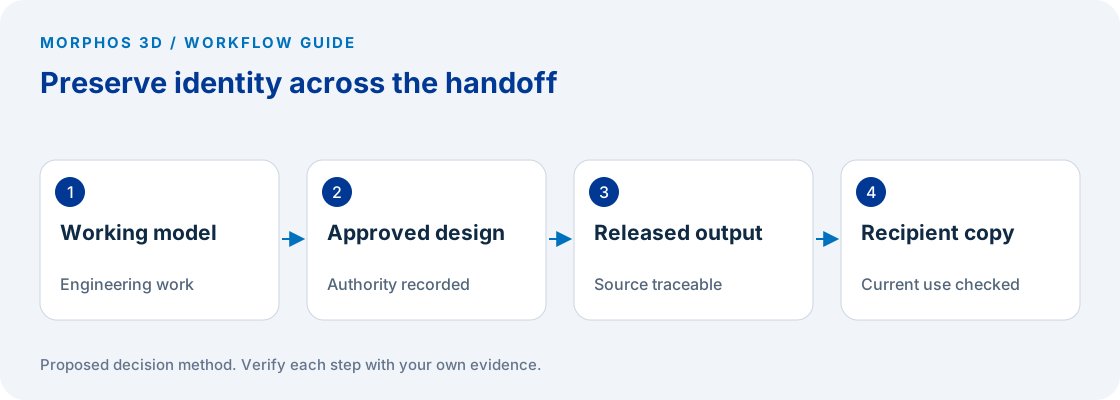
Distinguish saved work, approved revision and delivered output
A working file can change several times before it is approved. The approved design may then produce a PDF, an exchange model or another manufacturing deliverable. Those are separate records whose relationship has to remain identifiable.
SOLIDWORKS PDM revision labels can be associated with versions through configured workflow or permitted manual actions. A saved file is therefore not automatically equivalent to an approved release. The official revision-number documentation explains that distinction; the actual approval rule depends on the configured process. SOLIDWORKS PDM revision number administration.
Write down how your team identifies each state. Do not assume a filename suffix, a modification date or the most recent email proves approval. Ask which record authorizes use and who can change that authorization. That question matters whether the files sit in a shared folder, a vault or another managed system.
Check the relationship between native and exported files
Inspect the released drawing against the source identified by the approval record. Then inspect the PDF or exchange file that reached manufacturing. Confirm the part identifier, revision reference and change content, using the checks required by your own engineering process.
Look for an export step after approval that has no recorded acceptance. Also look for exports created before the approved change was completed. Either pattern can leave a technically valid file disconnected from the design that the approver intended to release.
Do not use a matching filename as the sole test. Record the source reference, release record and actual delivery location. If the current process cannot establish those relationships, make that missing traceability the finding rather than guessing which copy is correct.
Put the method to work
Bring one recent change and the package manufacturing actually received.
Use the worksheet belowFollow the change to every controlled recipient
List the intended recipients and the route each one uses. Manufacturing may receive a file through a job system, purchasing may send a package to a supplier, and inspection may keep a separate drawing copy. Check the routes that apply to the chosen job rather than assuming one engineering link reaches everyone.
Identify how superseded information is withdrawn or marked. A controlled source does not automatically remove an old attachment from a supplier inbox or a print from a work area. Assign responsibility for notification and for confirming the current package where the process requires it.
Ask what happens when the recipient is unavailable. A release method that depends entirely on one person's memory deserves a documented backup role. This is an operating responsibility, even when software can support the notification or access control.
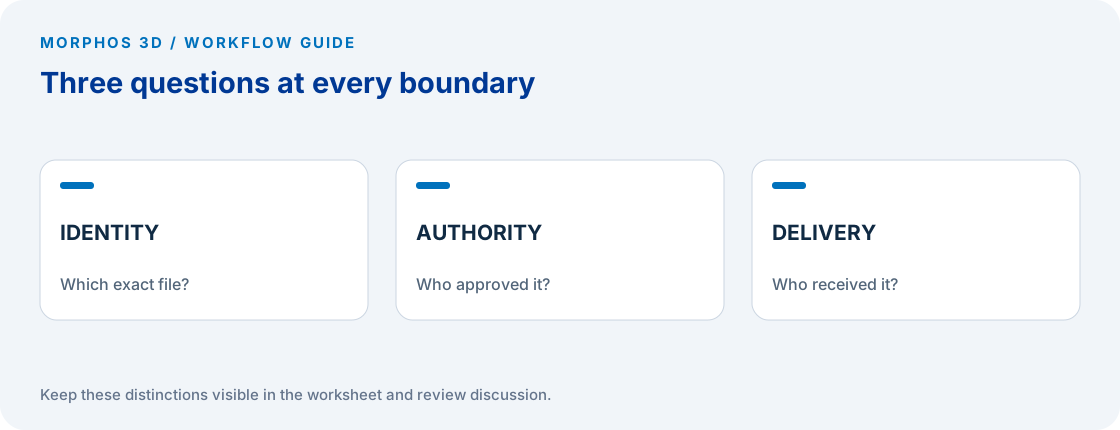
Turn the trace into one corrective action
Summarize the first point where file identity or authority becomes uncertain. If the approved source is clear but the export is not, focus on generating and checking the output. If the package is correct but an old copy remains in use, focus on distribution and withdrawal.
Choose a small improvement and repeat the trace on the next applicable change. Record the recipient's confirmation rather than considering an email notification alone to be proof of correct use. The acceptance condition is a usable, identifiable package at the point where the job proceeds.
If several jobs show the same weakness, the evidence can support a broader data-management discussion. If a single missing responsibility explains the issue, correcting that responsibility may be the appropriate first step. A trace should identify the problem before prescribing a platform.
Checks to carry into the discussion
| Handoff point | Ask for | Failure to investigate |
|---|---|---|
| Engineering approval | Authorizing record and source reference | Saved work treated as released |
| Output generation | Export tied to the approved source | Stale PDF or exchange model |
| Distribution | Actual package and delivery location | Several uncontrolled copies |
| Recipient use | File the recipient would use for the job | Approval inferred from filename |
| Later change | Notification and withdrawal record | Superseded information still available |
Download the working worksheet
Begin with the recipient copy and work backward, then follow the next change forward. Use references to controlled records rather than placing confidential designs inside the worksheet. Record uncertainty explicitly. A blank approval reference should lead to a question for the authorized owner, not an invented revision. After a correction, repeat the same trace and retain both records so the improvement can be inspected.
Fields: Job · Part identifier · Approved revision reference · Approval evidence · Native source · Exported output · Delivery location · Recipient role · Recipient confirmation · Superseded-copy action · Gap owner.
The worksheet and decision method are original Morphos 3D guidance. Fill them with your own evidence; the file contains no customer data or assumed results.
Bring one recent change and the package manufacturing actually received.
PDM does not retroactively withdraw uncontrolled emailed copies.
Frequently asked questions
Does the newest file always represent the approved revision?
No. New working changes can exist after an earlier revision was approved. Use the authorization record and the configured release process.
Does a vault remove old emailed drawings?
A controlled source does not itself withdraw every external copy. The release process still needs a defined approach to distribution, change notification and superseded information.
Official references and method
References reviewed October 5, 2026. Product references support the specific capabilities discussed; the worksheets and decision steps are proposed guidance, not vendor benchmarks.
The linked help explains the underlying concept in the named documentation release. Confirm any setup procedure against the documentation for your installed version.
Discuss the next test
Bring one recent change and the package manufacturing actually received.